★★★★★ | Five stars
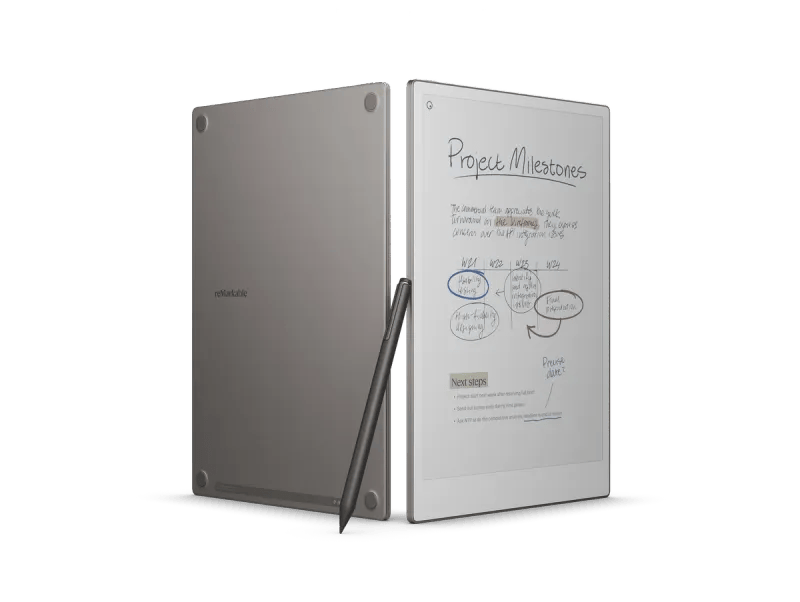
There is a particular pleasure in seeing a digital device behave as though it has nothing to prove. The reMarkable Paper Pro is large, expensive and technically sophisticated, but it does not greet you with a carnival of apps. It offers a page. You can write on it in color, read a document, draw an arrow between two ideas and move on. It is a luxury tablet for people who would rather not spend the day behaving as though they own a tablet. That sounds contradictory. It is also the best thing about it.
Where the reMarkable 2 made a virtue of monochrome simplicity, the Paper Pro asks what happens when a little color is allowed into the room. Its 11.8-inch Canvas Color display uses technology based on E Ink Gallery 3, which is a very different proposition from the saturated OLED panel of an iPad Pro. Colors have a softer, more printed quality. That is not inherently a weakness. For underlining a passage, distinguishing a note from an objection or marking a document, subtle color can be more useful than a dazzling one.
Size is part of the personality. The screen gives documents room to breathe, and the adjustable reading light makes the device more flexible than the unlit reMarkable 2. It is still thin at 5.1 millimeters, though the roughly 525-gram weight is a reminder that a full-size working surface is a different object from a pocket notebook. There is enough real estate for serious pages, sketches and drafts. The screen makes the tablet feel closer to an office notepad than to an oversized phone.
Writing is the main performance, and the company clearly knows it. ReMarkable advertises low-latency pen input, pressure-sensitive writing and a collection of digital tools whose names are pleasingly ordinary: pencil, marker, highlighter. The machinery is elaborate; the language is not. You do not have to learn a new artistic vocabulary to draw a box around a sentence. And while the screen can perform complex digital tricks, there remains something satisfying about treating it as the place where a thought first appears.
A little color goes a long way
The most persuasive use of color is organization. In a notebook full of interviews or story ideas, a different shade can indicate an unanswered question or a passage that needs attention. A chart becomes easier to read when its parts are distinguishable. A marked-up PDF acquires a visual hierarchy beyond a collection of identical gray strokes. None of that requires a screen capable of showing a Hollywood blockbuster at 120 frames per second. It requires color that survives the transition from imagination to paper-like display.
ReMarkable’s operating system is intentionally constrained. You can import PDFs and EPUB files, arrange folders and tags, convert handwriting and synchronize material through companion apps. You cannot expect the broad software universe available on an Android tablet. This is a narrower but more coherent relationship with technology. You open a document because you intend to read or annotate it, not because an application has persuaded you there is something urgent to check. The distinction matters to anyone whose working day is already fragmented.
One surprise of the category is how much emotion can attach to a pen. We do not discuss the shape of a keyboard character with the same affection we reserve for a favorite fountain pen or notebook. A digital marker is an attempt to bring that private attachment into the electronic world. It must feel natural enough that attention can remain on the words. There are still unavoidable differences between ink on paper and stylus on a textured display, but the goal of disappearing into the act of writing is a sensible one.
The Paper Pro is emphatically not a cheap way to take notes. A pad of paper wins that contest before it begins. Even a conventional tablet may look more economical when measured by the number of things it can do. But those comparisons misunderstand the buyer who wants a dedicated writing space. For that person, the question is whether the device helps turn scattered pages, annotated documents and loose ideas into a system that can be carried around without also carrying the full clamor of a computer.
A working surface, not a tiny television
The display’s behavior remains distinct from OLED or LCD. Refreshes and the restrained colors remind you that this is electronic paper. Photographs and moving images are not the point. A full-color digital artist looking for rapid brush effects and thousands of layers may reasonably prefer an iPad. Likewise, anyone who needs spreadsheets, video calls and a complicated web application is shopping for a different category. The Paper Pro’s limitations are only disappointing if the product is asked to become something it was never intended to be.
I particularly like the idea of hardware that regards a writer’s attention as something worth protecting. The software industry treats every spare second as an opportunity for another alert, another engagement metric, another recommendation. The Paper Pro cannot abolish that world, but it can offer an island within it. A page contains the thing you are working on. Nothing needs to be animated or refreshed to maintain your interest. The unhurried pace feels less like an absence of performance than a deliberate form of it.
ReMarkable rates battery life at up to two weeks, a manufacturer estimate dependent on use, and provides 64GB of internal storage. Those numbers help make the tablet a plausible everyday notebook. Yet its most important specification is harder to quantify: how readily it can become part of the habit of sitting down and making a mark. If using it feels ceremonial, it may stay in a drawer. If it becomes ordinary, the hardware has succeeded in the most interesting way.
The different form factors within the reMarkable family also illuminate what makes the Paper Pro distinctive. The original reMarkable 2 is wonderfully straightforward, a thin monochrome notebook that scarcely seems interested in being anything else. The smaller Move is meant to be available at a moment’s notice. The Paper Pro feels more like the desk itself: an expansive, deliberate surface suited to lingering over a document, sketch or set of notes. Its appeal is not simply that the specifications have increased. The physical space encourages a different mode of attention.
Color is most useful when it does not demand admiration. A gentle highlight on a paragraph can indicate what matters without overpowering the text. A diagram becomes easier to follow when separate elements can be marked in different tones. A page of notes can distinguish a first idea from a later objection. This is not the luminous color of a phone; it is a set of working tools. I suspect that is why the Paper Pro seems so coherent. Every conspicuous addition—the bigger screen, the light, the palette—still serves the original idea of making marks on a page.
Five stars for the Paper Pro because it expands the digital notebook without drowning it in features. Color, light and a generous writing surface make it more flexible than the older black-and-white model, while the underlying discipline remains intact. A computer can contain the whole world. Sometimes it is nicer to own one that contains a blank page, a pen and enough silence to think.
Product details: reMarkable technical documentation.

