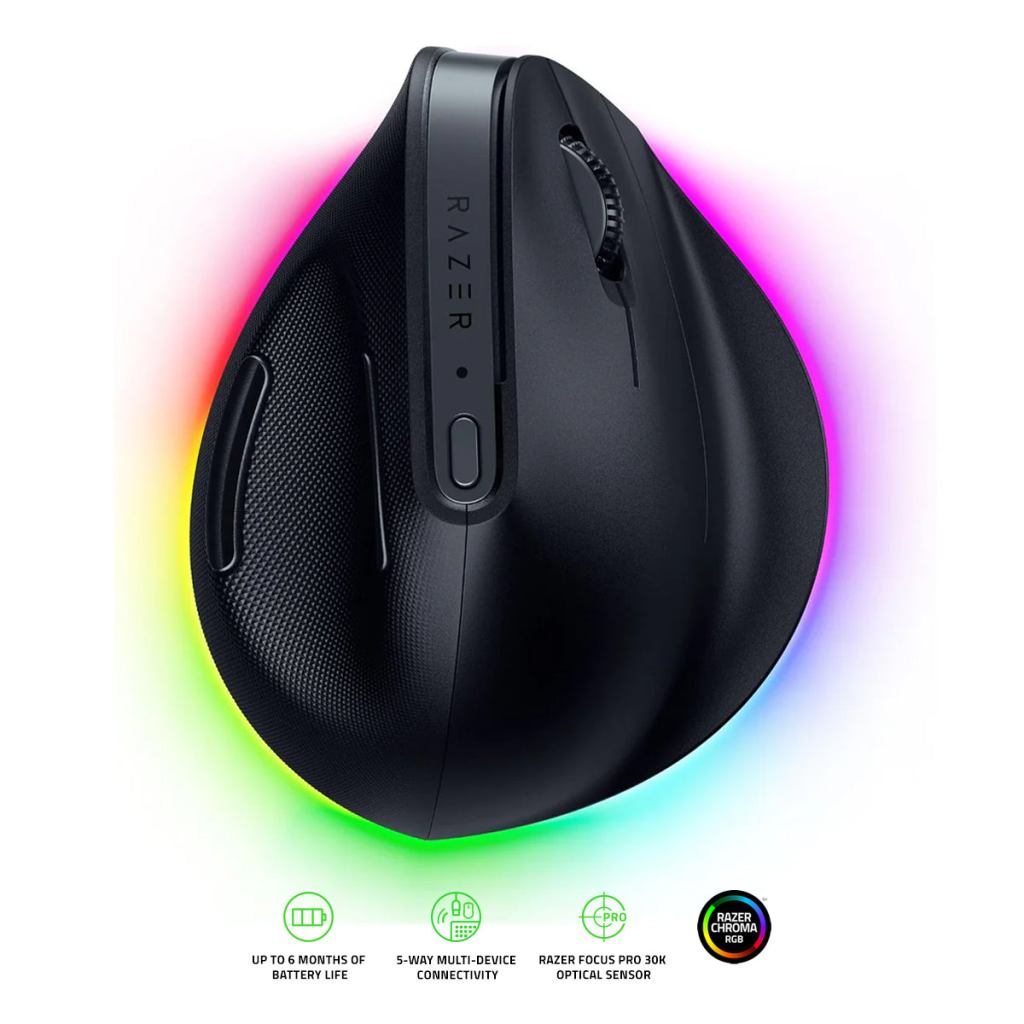
Razer Pro Click V2 Vertical. Product image: Razer / DataBlitz.
Photo: Razer via DataBlitz
Razer’s Pro Click V2 Vertical looks as though an ordinary office mouse has been pulled upward by its roof. The right-hand buttons and wheel climb a steeply angled surface, and the palm rests against a substantial body rather than hovering over a flat shell. It is not an especially discreet device, despite the neutral colors and professional aspirations. When I began using it for long days of writing and research, the question was not whether the shape looked comfortable. It was whether the unfamiliar posture would remain comfortable once the work began.
The mouse is part of Razer’s attempt to build more than gaming accessories. Its collaboration with Humanscale is reflected in an ergonomic grip, while the electronics borrow from the company’s fast optical pointing devices. At around $120 in its original configuration, the result is neither a cheap experiment nor a conventional office mouse with a small tilt. It is a fully committed right-handed vertical design whose usefulness rests on how a particular hand responds to its geometry.
A shape that does not apologize
Vertical mice rotate the hand away from the palm-down position used with conventional models. The Pro Click V2 Vertical adopts a handshake-like orientation and provides a substantial thumb surface, sculpted sides and a large base. At roughly 150 grams, it has more physical presence than lightweight gaming mice, but that mass can contribute to a planted, stable sensation when moving across a desk. I found the construction solid, without obvious creaking or flex, and the matte finish made the grip feel secure.
The adjustment period was shorter than I expected. A vertical mouse inevitably changes how the wrist and fingers coordinate small cursor movements, but the Razer’s controls were located where the hand naturally settled. After a period of adaptation, ordinary selections and browser navigation became straightforward. The body is substantial, however, and people with small hands may struggle to reach every control without shifting their grip. There is also no left-handed version, a limitation that excludes a considerable share of potential users.
It is important not to turn a favorable experience into a medical promise. A more upright position changes the rotational posture of the forearm, and some people may find that comfortable. It does not follow that every user will experience less pain, or that the device can prevent or treat repetitive strain injuries. Chair position, desk height, breaks and existing conditions all matter. The result I can describe is that this mouse felt comfortable during my working routine, not that its geometry has been clinically proven to solve a particular problem.
Razer’s gaming heritage is still visible
The Pro Click V2 Vertical includes a high-resolution Focus Pro optical sensor with a quoted maximum of 30,000 dpi. That is more sensitivity than almost any office task demands. But the sensor performed reliably in the everyday conditions that matter to me, including moving among large documents and making small selections. It was quick enough that I stopped thinking about the electronic performance and concentrated on the physical shape. A high specification is useful only insofar as it supports that dependable experience.
The main clicks have a clear, immediate response, and the wheel offers tactile scrolling that is easy to control. What is missing is the free-spinning and tilt-enabled sophistication available on some other premium productivity mice, including the standard Pro Click V2. That omission may be felt keenly by people who spend hours moving sideways through spreadsheets or editing timelines. A specialized ergonomic shell and an exceptional sensor do not automatically make a device the best productivity controller for every application.
The button layout is conventional enough to become familiar, and sensitivity can be changed with a dedicated control. Razer’s Synapse software offers assignments and other settings, although some features require signing into the company’s software ecosystem. A person who wants a device that simply works without an account may find that irritating. The basic pointing and clicking should not depend on the application, but part of the product’s price is being paid for customization that not everybody will want to use.
A mouse for several computers
The Pro Click V2 Vertical supports different wireless connection methods, including Bluetooth and a dedicated receiver, with USB-C for charging. It is designed to move among a work laptop, desktop and other devices without demanding an entirely new input setup each time. I found those options useful, particularly because a large ergonomic mouse is more likely to remain at a primary desk while the computers around it change. The ability to maintain multiple connections is a practical feature rather than a dazzling one.
Razer advertises extended battery endurance, with a maximum that can approach six months under specified conditions. That is a manufacturer estimate, not a six-month experiment I conducted. Short-term use gives some confidence about the charging process and ordinary operation but does not establish long-term battery health. The mouse can be used with USB-C when necessary. At this price, the more pressing durability concern is how its soft-touch surfaces and switches will age under sustained use.
The device also includes configurable lighting, a rather curious feature on a product chiefly concerned with ergonomic seriousness. I did not find it especially important. A subdued glow may add personality to the desk, but the relationship between fingers, buttons and wrist is why anybody should consider this mouse. The complexity of the electronics is most valuable when it disappears behind a consistently accurate pointer.
The trouble with a universal ergonomic claim
A steep vertical grip can feel transformative to one user and awkward to another. The Pro Click V2 Vertical is large enough that the size of the hand becomes a purchasing question in its own right. Somebody accustomed to a fingertip grip may find it difficult to make rapid tiny movements. A person who likes to settle the whole hand into a stable support may welcome exactly the same design. The best way to judge such a mouse is to spend meaningful time with it rather than trust a single angle printed on the box.
The price also invites comparison with the inexpensive vertical mice now available. Many can place the hand in a broadly similar orientation for a fraction of the cost. Razer’s premium buys a more sophisticated sensor, better materials, wireless flexibility and software controls, not a radically different law of ergonomics. Those extras matter to someone using several computers and demanding precise pointer behavior. They matter less if the sole purpose is to discover whether a vertical mouse feels comfortable.
I liked the Pro Click V2 Vertical for its solidity, its convincing grip and its reliable tracking. I missed the more elaborate wheel functions of other premium productivity mice, and I would hesitate to recommend the large shape to someone with small hands. This is a capable piece of desktop equipment, not a cure and not a universal upgrade. For the person whose hand fits it, though, it makes a serious case that a mouse can be both physically unconventional and electronically accomplished.

