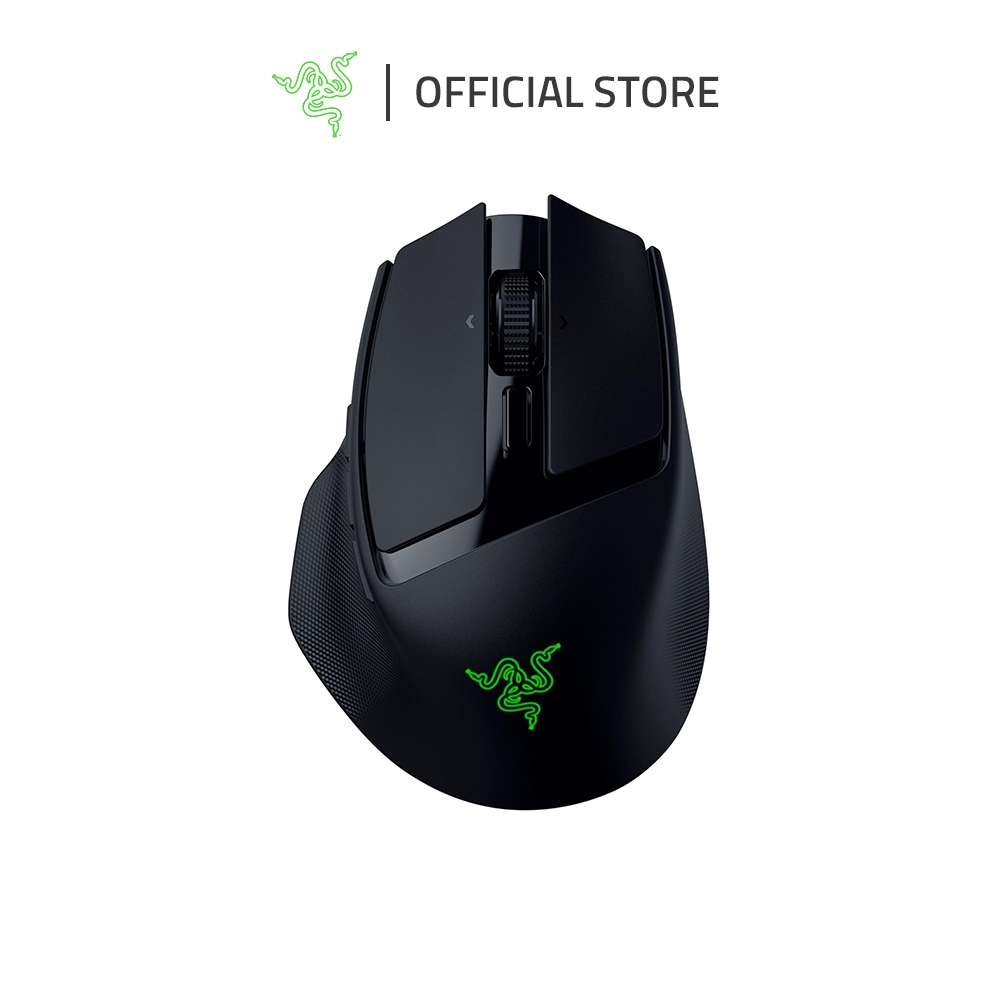
Razer Basilisk Mobile. Product image: Razer.
Photo: Razer official store listing
The trouble with a travel mouse becomes apparent when you stop traveling. Many compact models are comfortable enough for twenty minutes in an airport lounge but vaguely miserable through a full afternoon of work. Razer’s Basilisk Mobile tries to avoid that fate by shrinking the familiar Basilisk shape without discarding what makes it comfortable: a proper thumb rest, a raised body and a generous collection of controls. After using it for gaming and ordinary computer work, I found it behaved less like a miniaturized compromise than a smaller version of a serious mouse.
The Basilisk Mobile arrived in 2025 with an $89.99 price and a simple pitch: one pointing device that can travel with a laptop and still cope with demanding games. There are lighter mice and smaller mice. The Basilisk makes the case for carrying a few more grams in exchange for the shape and functions that often disappear from portable designs. It is a sensible approach, particularly for somebody who travels for work but does not want to come home and replace every peripheral on the desk.
A familiar shape in a smaller package
The mouse measures roughly 111.5 millimeters long and weighs just under 77 grams. Those numbers place it between the tiny flat mice intended for laptop bags and the larger models designed to cradle a palm. Razer keeps the elevated arch and a contoured thumb rest, giving the hand more support than an ordinary slim pointer. The textured sides and matte plastic finish provide grip without making the body look aggressively styled.
In use, the shell felt solid and free of conspicuous rattles or flex. I liked that its size did not force a fingertip grip: it remained comfortable with more than one ordinary hand position. This will depend on hand size, of course, and the compact dimensions may prove awkward for someone accustomed to a large desktop mouse. But the design is recognizably a Basilisk, not merely a generic oval with the company’s logo attached.
Razer has also kept the appearance restrained. There is some lighting, but the product does not seem designed primarily as an illuminated desk ornament. That matters on a business trip when the same device might be used in a meeting room, a hotel and a game at the end of the day. The best travel gear has a way of appearing appropriate in several environments without demanding that the owner make elaborate concessions.
The scroll wheel is a valuable passenger
The HyperScroll wheel can move in precise steps or spin more freely through long pages. It also supports sideways scrolling. I appreciated that combination in both ordinary research and software interfaces with horizontal controls. Most travel mice sacrifice sophisticated wheels to save money or space; Razer decided that getting through a long document efficiently remains important even away from a permanent desk.
A wheel is an unusually persuasive feature because its value accumulates in tiny moments. Switching from a document to a settings menu might take only seconds, but the difference between precise movement and rapid scrolling can remove a surprising amount of friction. Razer’s decision to preserve that function gives the Basilisk Mobile a daily purpose beyond its gaming performance. Even people who rarely play games might find the control worth having.
There are ten programmable inputs, depending on how the wheel functions are counted, and Razer’s Synapse software allows the user to assign commands and save configurations. The array of controls may seem excessive on something intended for a bag, but it lets the device retain much of the convenience of a full-sized productivity mouse. You do not need to use every shortcut. I would begin with the ones that replace repetitive work and ignore the rest until a clear purpose emerges.
Three ways to connect
Razer offers a dedicated HyperSpeed 2.4GHz receiver, Bluetooth and a wired USB-C connection. This is an especially sensible combination for travel. The dedicated connection prioritizes gaming response, while Bluetooth makes it easier to attach a laptop or tablet without sacrificing a port. Wired operation remains available when charging or when wireless use is inconvenient. In my testing, the mouse remained responsive in the games and ordinary applications I used.
The Focus X 18K sensor supports up to 18,000 dpi. Such a ceiling does not explain why a mouse feels good, and very few owners will need to approach it. More important is consistency. I found tracking smooth on the surfaces I tested, with no obvious jumps or drift during normal work. Game movements felt controlled. A travel mouse must cope with desks and mouse pads that vary far more than a permanent setup, and the Basilisk did not make that variability a constant concern.
Razer advertises substantially longer battery life over Bluetooth than over its gaming-oriented wireless connection, with figures that can exceed a week of ordinary use by a wide margin. Those are manufacturer ratings and depend on settings, lighting and connection mode. My use demonstrated that charging need not become a daily chore, but it was not a controlled endurance laboratory. USB-C provides a straightforward fallback, and the ability to use the mouse while connected avoids an inconvenient interruption.
The strange AI button
The Basilisk Mobile includes an AI-related shortcut that can launch a supported assistant or action. This may sound modern, but its usefulness depends less on mouse hardware than on the applications and services the user chooses. I am more interested in having an extra programmable control than in treating a shortcut as a form of intelligence. The button can be reassigned, which is fortunate because a dedicated AI action may be irrelevant or even intrusive during gaming.
There is also a practical question about accidental activation. A control placed near the thumb must be accessible enough to use and isolated enough to avoid unexpected triggers. People who dislike the default behavior can map it to something predictable or turn it off. This is a sound example of why software customization matters: a manufacturer should not insist that a fashionable feature remain part of every buyer’s workflow.
The problem it solves
The Basilisk Mobile is not the absolute smallest option and it cannot supply the full palm support of a large desktop mouse. It occupies a useful middle category, however. The wheel is versatile, the buttons and sensor performed reliably, and the combination of Bluetooth and a gaming receiver makes it suitable for computers with different roles. For a laptop user who occasionally plays serious games, that is a persuasive collection of compromises.
I would choose it over an ultra-flat travel mouse if I expected to work for hours away from my usual desk. I would hesitate only if space in the bag were critical or if the larger Basilisk shape already fit my hand perfectly at home. The Mobile’s achievement is to preserve a mature, capable experience while becoming modestly easier to carry. It is not a mouse that asks you to sacrifice comfort as the price of mobility. That is rarer than it ought to be.

