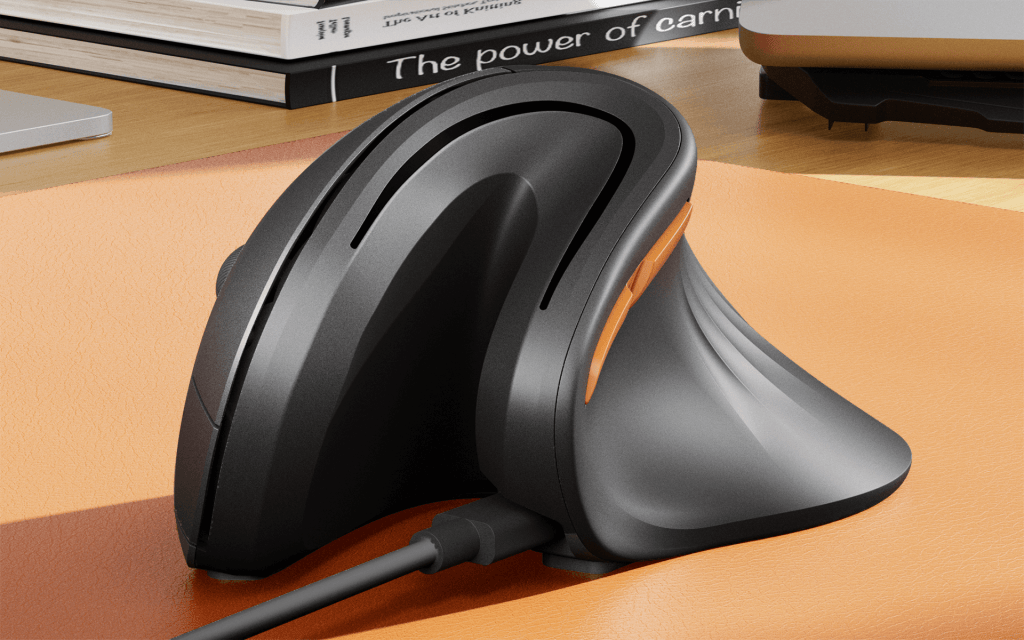
ProtoArc EM11 NL. Product image: ProtoArc.
During my first afternoon with the ProtoArc EM11 NL, I missed the same browser tab three times. The mouse had not failed; I had. My hand was standing at a 58-degree angle, and the small movements I normally make without conscious thought suddenly required planning. With a deadline approaching, I abandoned the pointer and used a keyboard shortcut. It was a humbling introduction to a device whose entire promise is to make computer work more comfortable.
This is a remarkably inexpensive way to discover whether a vertical mouse suits you. The EM11 NL generally costs around $25 to $35, far less than many premium ergonomic alternatives. It has a high-sided, sculpted body and a grip that rotates the hand into a near-handshake position. In contrast to gently tilted mice that preserve most of a conventional posture, it requires a new habit. I used it for more than a week and found that the awkwardness did diminish. The early frustrations were real, however, and the low price is part of why it is possible to forgive them.
The shape is a proposition, not a treatment
The reason for making a mouse vertical is mechanical rather than electronic. A flat mouse typically rotates the forearm so that the palm faces downward. A steeper shape allows a more upright position and changes which parts of the arm perform the same movements. Manufacturers often connect that altered posture with reductions in strain. Whether a particular design helps a particular person depends on much more than the stated angle, and no consumer review can establish a medical outcome. The question I could answer was whether I could perform ordinary work without feeling as though I were operating unfamiliar machinery.
Initially, the answer was not especially encouraging. I overshot links and found that clicking precise targets demanded concentration. The mouse was tracking; my hand simply had not adapted. After several days, the movements became much more predictable. I stopped overthinking simple navigation and began treating the vertical grip as ordinary. By the end of the week, switching back and forth was less of a nuisance, although I never mistook the ProtoArc for a conventional mouse.
The body has a matte finish and a moderately sculpted thumb rest, with enough contour to guide the hand into place. It is not a luxury object, and its lightweight construction does not have the dense solidity of premium office accessories. I did not find that disqualifying. The mouse is affordable enough that the more important issues concern fit, tracking and whether the user can tolerate the adjustment. Its substantial vertical profile may also fit smaller and medium hands better than very large ones, so measuring before buying is sensible.
One of the cheapest experiments in desk ergonomics
At this price, the EM11 NL is not trying to compete with expensive productivity mice on software or exotic components. Its optical sensor offers three preset sensitivity levels, 1,000, 1,600 and 2,400 dpi. Those options cover the practical range for everyday navigation but leave little room for fine tuning. There is no elaborate companion application for custom macros and button assignments. For somebody who lives by a carefully configured shortcut system, that limitation is worth considering.
The basic controls were adequate in use, with subdued button noise and a wheel that handled routine pages without attracting much attention. The real difficulty was not electronic performance but learning how to move a vertically oriented object. People who use a fingertip grip and tiny wrist motions may initially find the change particularly pronounced. The mouse encourages a different physical gesture, and it would be dishonest to promise the transition will be effortless just because some owners find it comfortable.
I would also resist treating the EM11 NL as a gaming peripheral. Its wireless reporting rates and modest sensor specifications are aimed at office work, not high-speed competitive play. Games that demand repeated rapid reactions may expose a sluggishness or physical unfamiliarity that is irrelevant when moving around browser windows. That does not make the mouse deficient. A specialized tool is allowed to have a narrow purpose, especially when it costs less than a decent lunch.
Three computers, one oddly shaped mouse
ProtoArc offers a USB receiver and Bluetooth connections, allowing the mouse to switch among three devices. That is a pleasing amount of flexibility at the price, particularly for a small home workstation shared by several computers. The company includes a rechargeable battery and USB-C charging, avoiding the disposable cells that still appear in budget mice. These conveniences do not make the shape more familiar, but they keep the everyday ownership experience relatively straightforward.
The wireless pairing process did not become the central issue in my tests. Once connected, the pointer performed the ordinary tasks demanded of it. In a way this emphasized the unusual ergonomics: the hardware was doing its job, while the operator was still learning. Buyers should not confuse that initial adjustment period with a fault in the tracking system. Conversely, there is little point persisting with a shape that continues to cause discomfort simply because the manufacturer says it is better for you.
The absence of customization software is another mixed blessing. Some products bury essential behavior beneath accounts, permissions and persistent applications. The EM11 NL works as a fairly simple pointing device. It gives up programmable buttons and elaborate profiles in return. If you have a particular shortcut-heavy workflow, the missing controls will be apparent quickly. If you only need to point, click and scroll, there may be relief in not installing anything at all.
A week changes the calculation
My initial reaction was skepticism, sharpened by the embarrassment of missing easy targets under deadline pressure. The subsequent days altered that impression. Once the vertical grip became less foreign, the mouse felt comfortable enough for sustained work. I did not conduct a clinical assessment or a controlled comparison of muscle activity. What I can report is simpler: the frustrating learning curve was temporary in my use, and the device did not make me wish to abandon the experiment entirely.
More expensive vertical mice can offer better materials, finer tracking adjustments and richer software. They cannot spare the buyer from discovering whether this way of holding a pointer makes sense. The ProtoArc answers that question cheaply. Its modest construction, limited sensitivity settings and lack of advanced programming are real compromises, but they are also consistent with what the product costs. The manufacturer provides a two-year limited warranty, a useful reassurance for a budget device.
I would recommend the EM11 NL as an inexpensive trial for somebody curious about vertical pointing, not as a miraculous solution to aches and pains. Give yourself time and a task that is not urgent. The first afternoon may be irritating. Several days later, it may be difficult to remember why the shape seemed so alien. At about $25, the risk is relatively small, and the experience teaches something valuable about how much of using a computer is really a matter of learned movement.

