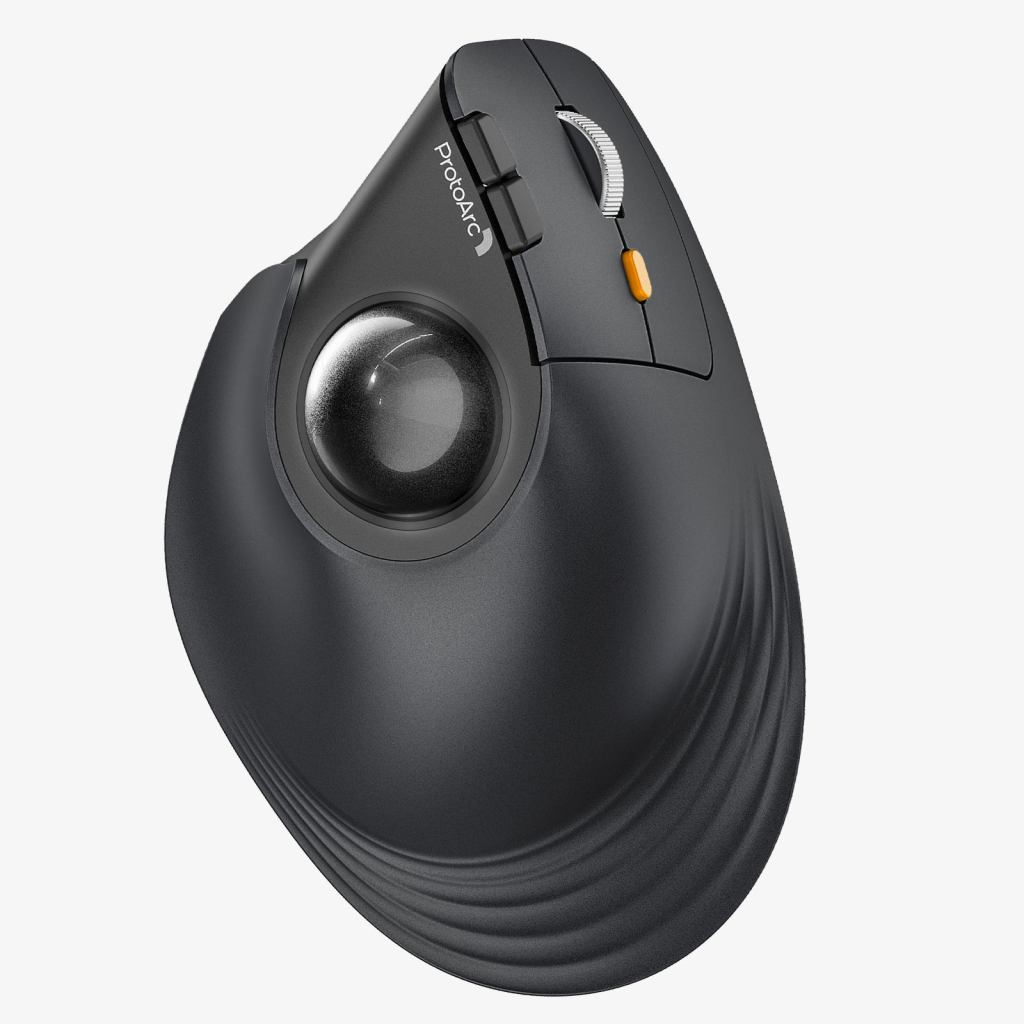
ProtoArc EM05 NL. Product image: ProtoArc.
Image: ProtoArc EM05 NL · Manufacturer product image.
A trackball usually presents the user with a choice: keep the hand in a familiar mouse-like shape and move the pointer with a thumb, or abandon the idea of a mouse altogether and operate a large ball with the fingers. ProtoArc’s EM05 NL introduces a stranger combination. Its body rises into a nearly vertical grip, while a smaller trackball sits beneath the thumb. The pointer moves without the device sliding across the desk. After using it for documents, browsing and ordinary work, I found the arrangement more sensible than it initially appeared, though it demands that the user change two habits at once.
The EM05 NL is a comparatively inexpensive ergonomic accessory, priced around $60 when I evaluated it. That is not impulse-buy territory for everybody, but it is far below the cost of some elaborate trackballs and specialized pointing systems. The design is intended to keep the hand upright and stationary. Its success depends on whether the thumb can manage precise cursor movement comfortably, a question that no manufacturer specification or illustration can answer for every buyer.
A mouse-shaped object that doesn’t move
The most important fact about the EM05 is also the easiest to forget. It remains stationary while the thumb rolls a small ball on its left side. That changes the spatial requirements of a desk. A conventional mouse needs open space beside the keyboard for repeated travel and occasional lifting. A trackball only needs a place to sit. In my testing, the EM05 worked well in that role, especially on a crowded desk where a mouse pad would have competed with papers and other objects.
The body is angled at about 62 degrees, with a sculpted grip designed to place the hand closer to a handshake orientation. The matte surface is reasonably secure and the shape gives the palm a natural resting place. That geometry is distinctly different from the modest tilt of some ergonomic mice. It also makes the device better suited to certain hand sizes. A user with unusually large hands may find the available space for the palm and little finger restrictive.
The central trade-off is between stillness and familiarity. Your arm no longer needs to move the mouse across the desk, but your thumb must perform the precise motions that the whole hand once supplied. Initially, that can feel like exchanging a well-practiced movement for one that requires conscious attention. I found that the transition became easier as I spent more time with the device, and the physical arrangement began to feel logical. I would not pretend that everybody will reach the same result in the same amount of time.
The thumb becomes the navigator
The ball rotates freely within its socket, allowing broad pointer movement with a deliberate roll and finer adjustments with smaller motions. The EM05 provides five sensitivity presets, ranging from 200 to 1,600 dpi, available through a physical control. I found the midrange values more manageable for routine desktop tasks than either extreme. With the sensitivity too high, a small movement of the thumb could send the cursor farther than intended; too low, and traversing a large display required repeated rolls.
That adjustment is particularly consequential on a trackball. Unlike a conventional mouse, where the user can change the length of a physical movement across the pad, the available travel is constrained by the surface of the ball and the dexterity of the thumb. A predictable sensitivity setting helps the device become comfortable. ProtoArc does not provide the deep per-application tuning associated with expensive programmable mice. For routine office work, the presets were workable, but specialists may find them limiting.
The conventional buttons and scroll wheel are located along the upright body. The main clicks felt adequate rather than luxurious, and the wheel performed the ordinary business of navigating pages. The more specialized experience comes entirely from the ball and grip. I appreciated that the manufacturer did not clutter the design with an elaborate set of functions. That simplicity also means the EM05 is less attractive to someone whose productivity routine depends on numerous programmable shortcuts.
The trackball has a maintenance habit
A conventional optical mouse can usually be wiped clean and forgotten. A trackball invites a different kind of attention. Dust and skin oils gradually collect around the ball and its supports, making occasional cleaning necessary to preserve smooth movement. That is not a serious engineering failure, but it is a maintenance task that owners should expect. A device sold on the promise of reduced physical effort can still require a little more care than the mouse it replaces.
Nor should the upright position be mistaken for a guaranteed cure for wrist pain. A changed forearm angle may feel better for some people, while repeated thumb movement may prove uncomfortable for others. The correct choice depends on the individual, desk setup and pattern of use. My experience suggests the design can be comfortable for extended work once the technique becomes familiar. It does not prove that it will reduce symptoms for every user or replace advice from a qualified professional.
Three devices and ordinary charging
The EM05 NL supports Bluetooth and a dedicated USB wireless receiver, enabling connections with several computers. In testing I could move between a laptop, desktop and tablet without an especially complicated setup. That is useful on a desk where different systems take turns being the main machine. The product also charges through USB-C, avoiding the need to keep disposable batteries in a drawer. These are modest conveniences that become valuable when a peripheral is used daily.
The company quotes a rechargeable battery capacity of 500mAh and various endurance estimates under its own conditions. I did not conduct a full battery rundown, so those figures should remain manufacturer claims rather than measurements from my desk. The meaningful practical observation is that charging and wireless pairing did not introduce a substantial new burden. Learning to control the ball was the significant change; the electronic operation felt comparatively ordinary.
Mac users should also check the behavior of secondary buttons, since some platform-specific functions may not be available in the same way as on Windows. The lack of sophisticated configuration software is a mixed blessing. It keeps the basic setup simple but makes it harder to reassign controls to match a specialized working routine. The EM05 belongs to the family of devices that solve one physical problem while leaving advanced customization to other products.
Who should try a vertical trackball?
The EM05 is most appealing to somebody who wants to keep a pointing device stationary and is curious about an upright grip. Its compact footprint suits a desk without much clear surface area, and the multi-device connections make it practical for people working across computers. It is less suited to fast competitive gaming, high-precision professional drawing or anyone who already finds repeated thumb movement uncomfortable. A conventional mouse or finger-operated trackball may be the better choice in those circumstances.
At roughly $60, it is a relatively accessible way to explore an unusual form of input. The physical build is not lavish, software customization is limited and the trackball requires cleaning. But the design has a coherent purpose. I liked the way it eliminated the need to move the whole mouse, and the upright grip became increasingly natural during ordinary writing and navigation. The EM05 NL is not trying to be everybody’s pointer. For a person prepared to learn its peculiar motions, it offers a useful alternative.
The broader lesson is that the familiar computer mouse is only one possible arrangement of fingers, wrist and cursor. After years of using a flat pointer, anything else can seem unnecessary. The ProtoArc does not make the old arrangement obsolete, and it carries problems of its own. It does demonstrate that moving a small ball with the thumb while the rest of the hand stays put can feel surprisingly sensible. That is enough to make it worth considering on a crowded working desk.

