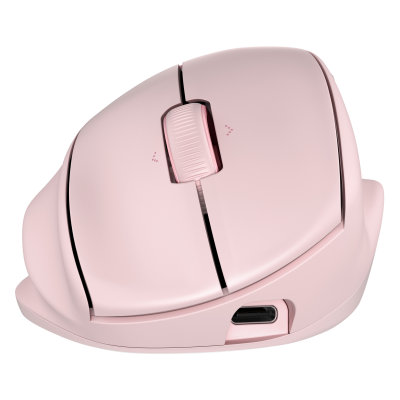
HP Tilt 720M. Product image: HP / HPmarket.
The problem with many ergonomic mice is not the theory. It’s the first hour. You sit down to do something ordinary, reach for the pointer, and discover that years of muscle memory have become an obstacle. The hand is at a strange angle; familiar targets are suddenly difficult to hit. HP’s Tilt Ergonomic Mouse 720M made a different first impression. Its 21-degree cant is conspicuous enough to alter the way the hand rests but modest enough that I could get on with writing almost immediately. That proved to be a more compelling achievement than any headline about comfort.
I have spent enough working days bouncing between documents, browser tabs and editing windows to know that a mouse can be irritating without actually malfunctioning. The 720M entered that routine for more than a week. Within an hour or two its shape felt familiar, and the adjustment period I had come to expect from radically vertical designs barely materialized. That does not make it a medical device or prove that it prevents injury. It does mean that its most important ergonomic proposal was easy to live with.
A small angle makes a noticeable difference
Twenty-one degrees is not much by the standards of vertical pointing devices. Some products approach a handshake orientation, rotating the hand almost onto its side. HP instead raises one side of the body and shapes its supporting surfaces around a hand that still recognizes the usual motion of a mouse. The difference is evident as soon as you settle into the grip. Your wrist is not forced into an unfamiliar position, while the palm and thumb have places to rest.
The relatively gentle geometry matters because comfort is not simply a question of what feels best during a showroom demonstration. A mouse has to remain agreeable after an hour of copy editing, several rounds of revision and a dozen interruptions. During my time with the 720M, I did not find myself repeatedly repositioning my hand or fighting the basic controls. The result was less dramatic than the ergonomic literature around input devices sometimes promises, and more useful for it.
The mouse is right-handed and fairly substantial, though not extravagantly large. It weighs about 120 grams and uses a soft-touch finish that gives the fingers a secure hold. My review unit was pink, a pale color that I found rather insipid. This is an aesthetic objection, not a functional one, and HP sells other finishes. The quality of the physical grip was more important than the color, particularly when using the mouse for long blocks of writing and web research.
A familiar mouse with a better wheel
HP resisted the urge to make the 720M merely an oddly shaped version of a cheap office mouse. It has a wheel that supports vertical and horizontal scrolling, and the ability to move sideways through a broad document is genuinely helpful. For anyone dealing with spreadsheets, timelines or wide interfaces, it is the sort of convenience that becomes routine. The buttons are easy to locate, and the pointer responded reliably to the ordinary work I asked it to do.
The company lists seven buttons, six of them programmable, with an optical sensor capable of up to 6,000 dpi. That resolution is far beyond what I would choose for everyday work, and a higher number does not guarantee better control. I care more about whether the pointer lands where I expect and whether the buttons can be reached without thought. The HP performed well on those practical measures. It did not make its speed the center of the experience.
The software offers enough customization to assign common commands and tune sensitivity. It is less expansive than the ecosystems attached to some premium Logitech mice, and a specialist who lives inside macros may find the HP restrictive. But there is an argument for a mouse whose everyday virtue is physical rather than digital. A slightly improved hand position and a useful scroll wheel do more for me than another panel full of settings I will configure once and never open again.
The stranger achievement is the power system
The 720M uses a supercapacitor instead of a conventional rechargeable lithium battery. Supercapacitors store electrical energy differently and can tolerate many charge cycles. HP advertises extremely quick charging: according to its specifications, a three-minute charge can support up to a month of use under defined conditions. I did not run a month-long battery test or verify that maximum. The claim is still interesting because it reframes charging as a tiny interruption rather than a recurring chore.
The idea has merit for a mouse that lives on a working desk. If you can obtain a meaningful amount of operating time from a brief connection to USB-C, it becomes less necessary to plan around battery depletion. There are caveats: endurance varies with the type of connection and pattern of use, and the supercapacitor does not make buttons and scroll mechanisms immune to wear. Nevertheless, it is refreshing to see a power-source innovation directed at reliability and ease of maintenance rather than another decorative feature.
HP offers both Bluetooth and a dedicated wireless receiver. That combination makes it practical to move between machines without sacrificing the simplicity of a familiar physical control. The mouse is compatible with a broad range of operating systems for essential pointing functions, though advanced software features can vary. This is a sensible compromise for people who work on a company computer but occasionally use a personal laptop or tablet.
The choice between moderation and commitment
A fully vertical mouse may appeal to someone who wants a more pronounced change in hand position and is willing to accept a difficult learning period. A premium productivity mouse may offer more controls and richer software. The Tilt 720M occupies the middle. It asks very little of the user while making a deliberate alteration to an ordinary posture. That makes it appealing to people who have tried ergonomic peripherals and abandoned them because the adaptation became another burden.
I would not promise that the 720M will eliminate somebody’s wrist discomfort, nor assume its shape is right for every hand. Chair height, desk position, working habits and individual physiology matter. But the actual experience was unusually untroubled. It felt natural quickly, remained comfortable through my working routine and offered practical scrolling and connection options. The supercapacitor is a clever addition, but the larger success is almost disappointingly ordinary: a mouse that felt better without forcing me to think about it.
At roughly $60 in the period of my review, the HP was reasonably positioned against other office peripherals that offer fewer ergonomic concessions. The pink finish did little for me, and the software lacks the glamour of more elaborate rivals. Yet I would rather live with those shortcomings than spend another week trying to train my hand to use a device whose purpose is supposedly to make work easier. HP has made a persuasive case for the modest angle.

