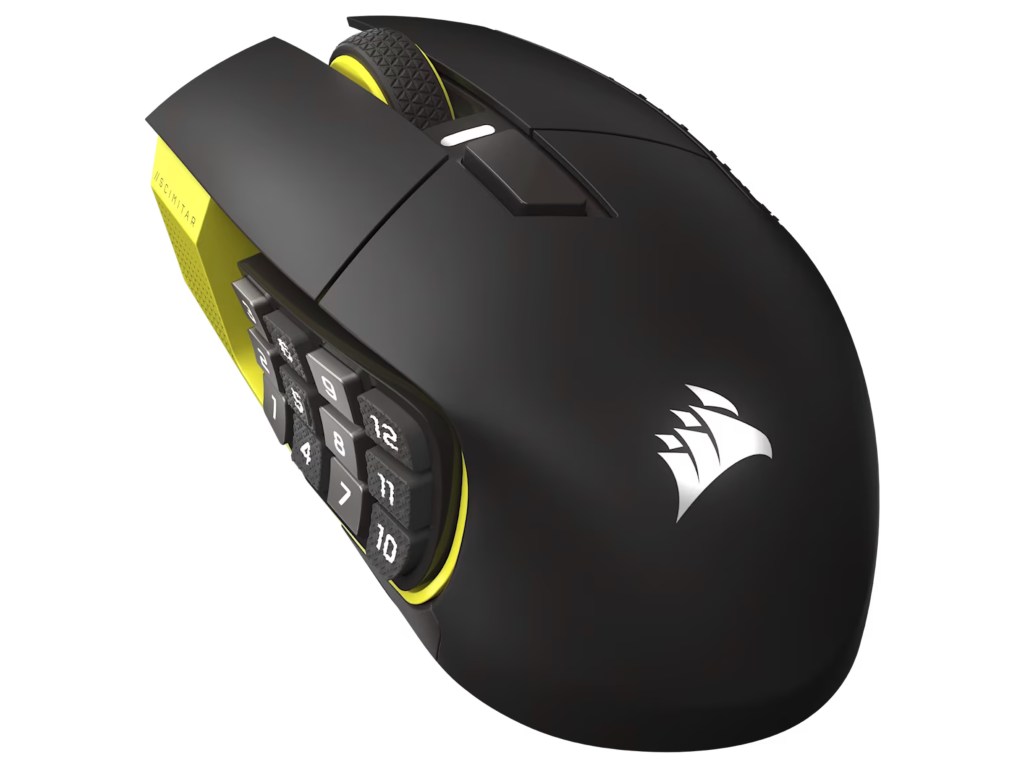
Corsair Scimitar Elite Wireless SE. Product image: Corsair.
Image: Corsair Scimitar Elite Wireless SE · Manufacturer product image.
The Corsair Scimitar Elite Wireless SE looks less like an ordinary mouse than a small switchboard. Twelve buttons crowd its left side in a three-by-four grid, with other controls scattered across the top. The arrangement was designed for games in which the player needs immediate access to a bewildering number of spells, commands and abilities. But after using the mouse, I began to see a second application: the same thumb-sized array can serve as a collection of shortcuts for people who spend their working lives in complicated software.
The Scimitar is a specialized product, and its $130 to $140 original price reflects that. Corsair has fitted the current Wireless SE version with an adjustable thumb panel, a fast optical sensor, three connection methods and integration with Elgato Stream Deck software. None of that makes it the best choice for casual web browsing. The value lies in the number of repetitive actions it can bring within reach, provided the owner is willing to learn a small but unfamiliar keyboard beneath the thumb.
The sliding keypad is the clever part
Corsair’s Key Slider arrangement allows the twelve-button side panel to move forward or backward by several millimeters. A screw underneath secures the chosen position. That mechanical adjustment matters because the usefulness of so many controls depends on whether the thumb can reach them without contorting the hand. In my testing the panel stayed stable, and I appreciated being able to position the central buttons where they felt easiest to locate. It is a more meaningful ergonomic feature than a decorative lighting animation.
The buttons have distinct surfaces and occupy a regular grid, but twelve closely spaced controls still demand practice. At first it is easy to think of them as a jumble of numbers. After assigning a few frequently used commands, the arrangement became more comprehensible. I would resist programming the entire panel on the first day. Start with actions that already have well-established places in your routine, learn those, and then expand. A shortcut that forces you to look down at the mouse is not really saving time.
The body itself is large, rounded and designed for a substantial right-handed grip. It weighs around 114 grams, considerably more than some competitive gaming mice. I did not find that mass particularly surprising given the amount of hardware attached. The textured surfaces give the fingers purchase, and the larger shape provides support during extended use. A person with small hands or a preference for a very light fingertip grip will probably find the device cumbersome.
The gaming performance is not an afterthought
The Wireless SE uses Corsair’s Marksman S optical sensor, advertised with a ceiling of 33,000 dpi, and optical main switches. It connects through Corsair’s low-latency wireless receiver, Bluetooth or USB-C. During testing, pointer movement was responsive and predictable. The principal limitation for some fast competitive games will not be an obvious lack of sensor capability. It will be the size and weight of the body, especially if the player likes to lift and reposition a mouse repeatedly.
There is no reason to use an extreme sensitivity setting merely because the specification exists. A mouse is easier to control when the pointer speed matches the movement of the hand, and the Scimitar’s larger shape makes a consistent grip particularly important. The sensor can deliver reliable tracking at ordinary settings while the buttons handle the commands that define MMO and strategy gameplay. In this kind of device, the relationship between input layout and muscle memory matters more than a headline number.
Bluetooth is useful for less demanding computer work or a laptop on which using a dedicated receiver is inconvenient. The gaming connection is the more appropriate choice when responsiveness matters. USB-C allows the mouse to operate by wire while charging. Corsair advertises long battery life under specific conditions, with substantial differences between wireless modes and settings. I did not run a controlled endurance test through the maximum claimed hours, so those values should be treated as manufacturer estimates.
What a gaming mouse can learn from Stream Deck
The SE model’s integration with Elgato Stream Deck is a central reason to take it seriously beyond gaming. Stream Deck controls can launch applications, trigger multi-step actions and manage production workflows. Mapping some of those commands to a mouse gives the thumb access to an unusually wide set of actions without leaving the main pointing device. For a streamer, editor or person using several communication and production tools, the appeal is obvious. A well-designed macro can collapse a sequence of repetitive inputs into one deliberate control.
The drawback is the configuration process. Corsair’s iCUE software is powerful but not especially restrained, and combining its settings with Stream Deck actions creates another layer to learn. A device that requires a complicated setup to save a few seconds per action only becomes worthwhile when those seconds accumulate over many days. The best use of the grid is not to demonstrate how many commands can be programmed. It is to select a small set that improves work and then leave the system alone.
For ordinary productivity, the extra buttons can handle navigation, window management and repeated editing commands. The mouse does not have to be used with streaming software to justify its existence. I found that the regular spacing made it possible to develop some familiarity with the grid. But the learning curve never entirely disappears, and the side panel is too specialized to be a universal recommendation. Someone who needs only Back and Forward controls will be paying for a great deal of unused plastic.
A specialized tool with a second life
The Scimitar Elite Wireless SE faces competitors that are lighter, smaller and cheaper. It also offers something those products cannot: a physical collection of controls large enough to change how complex software is used. The movable panel helps accommodate different thumb positions, and the basic tracking hardware is competent enough not to undermine the idea. Its weight, software complexity and price are the necessary compromises to acknowledge.
What I liked was the generosity of the design. It assumes the owner has more than a few commands worth issuing and is willing to spend time learning the hardware. That is a reasonable assumption for certain games and professional applications. It is not a sound assumption for everyone who buys a mouse. Corsair has built something between a pointer and a control console, and its success depends on whether your daily work contains enough repetition to make the extra keys useful.
The Scimitar’s 12-button side grid is excessive until the day you have mapped a set of actions you repeatedly need. Then it begins to feel like a tool you designed for yourself. I would not choose it for a laptop bag or competitive games built around minimal weight. I would consider it for an MMO, an editing workstation or a streaming setup where programmable controls are part of the work. It is a large, peculiar and surprisingly adaptable mouse that earns its place with function rather than restraint.

