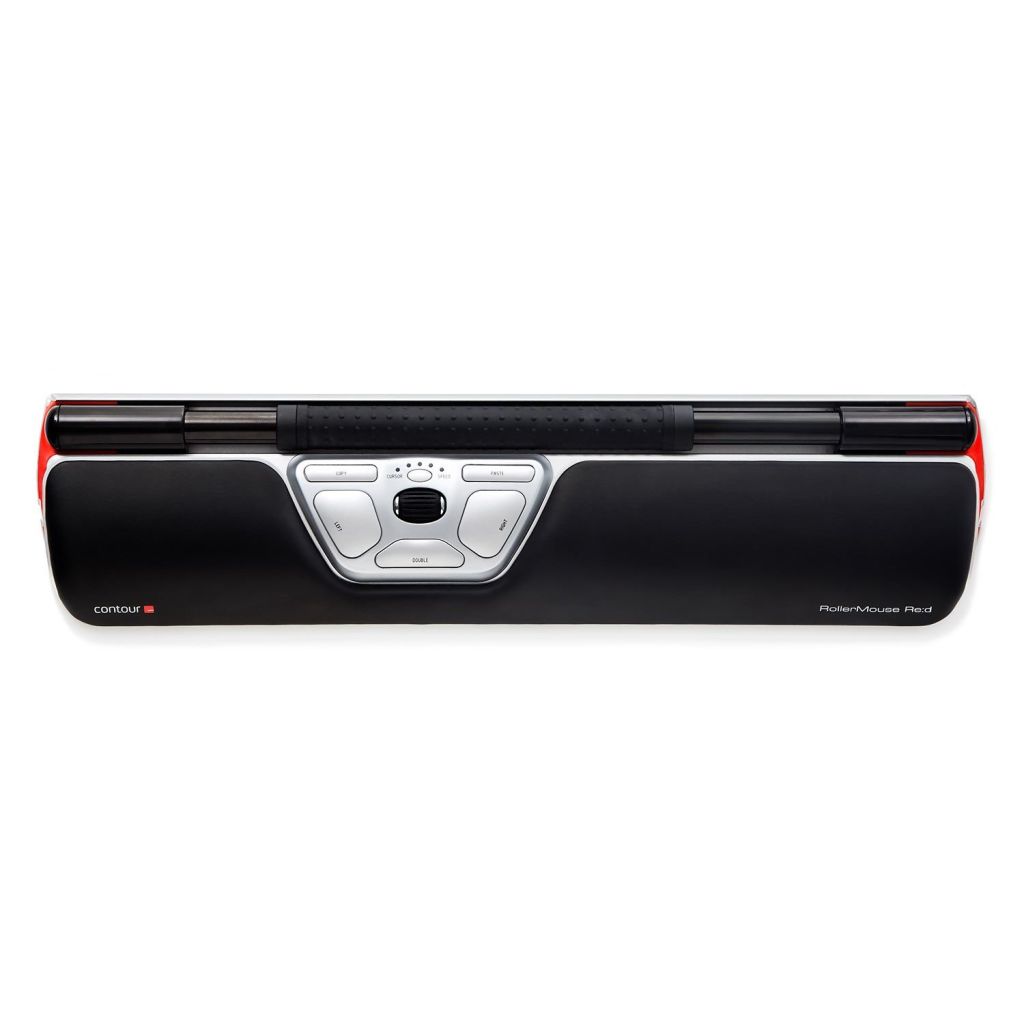
The $374 Contour RollerMouse Red looks like a wrist rest with an identity crisis. A long bar sits in front of your keyboard; slide it, roll it or press it, and the cursor follows. During my earlier testing, I found that this peculiar arrangement made long sessions of editing and browsing surprisingly comfortable. I also found plenty of reasons why a regular mouse might still be the better buy.
The RollerMouse is expensive enough to demand skepticism. Contour lists the wired Red at $374, a sum that could buy an excellent conventional mouse, keyboard and perhaps a respectable desk lamp besides. The question is what that price actually buys. After working with a RollerMouse Red for an earlier review assignment, I came away persuaded by its appeal to people who spend hours moving between a keyboard and a pointer. I was less convinced that everyone needs to reorganize a perfectly satisfactory desk around one.
This is not Contour’s newer Touch trackpad, which uses gestures, or the company’s Balance keyboard. The Red is a full-width pointing device with an aluminum body, a prominent roller bar, a wrist rest and a row of programmable controls. It attacks the problem of reaching for a mouse by removing the reach altogether. A conventional mouse asks you to move your hand away from typing. The Contour asks you to learn a different motion while staying at the keys.
Roll the bar, move the cursor
The mechanism is surprisingly easy to understand once you put a finger on it. Slide the roller bar horizontally and the pointer follows. Turn the bar and the pointer moves vertically. Press it down for a click, or use the large buttons arranged beneath. What initially looks like a strange office accessory becomes an input method with its own logic. It resembles neither a touchpad nor a trackball, although someone accustomed to either may adjust faster than a person who has only used a conventional mouse.
The Red’s seven-inch roller bar gives the pointer enough travel without requiring the entire hand to leave the keyboard. Its speed can be changed using controls on the device, and programmable buttons bring common commands close to the fingertips. Copy and paste buttons sound like an extravagance until you consider how often someone editing text performs those two operations. A designer who uses shortcuts constantly may have little interest in them. Someone reviewing documents all day may see the attraction immediately.
The hardware has the solidity of an office instrument intended to survive years of use. Its aluminum construction resists desk movement and gives the roller mechanism a reassuring base. A padded wrist rest supports the hands ahead of the keyboard. Contour supplies keyboard risers to help bring the typing surface into alignment with the RollerMouse. This is a small detail, but it matters: if your keyboard sits too high or low behind the device, the supposed ergonomic improvement could simply introduce a different awkward angle.
There is a physical cost to the arrangement. The Red takes up roughly sixteen inches across the front of the keyboard, with additional depth for its wrist support. On a crowded desk it can turn into another object to work around. Anyone using a shallow table, a laptop perched on a coffee-shop surface or a setup that must be packed away after every session should measure carefully. This is fundamentally a permanent-desk product, not a clever travel mouse.
What changed during actual work
The early adjustment was smaller than its appearance suggested. My notes from the original testing period describe a rapid transition during ordinary writing, browsing and spreadsheet tasks. After several days, reaching out to the side for a conventional mouse had begun to feel less efficient. That is a subjective observation from the earlier test, not a claim that the device will improve everyone’s speed or that I have just completed another week-long evaluation.
The strongest argument for the Red appeared during text-heavy work. The movement between selecting a passage, scrolling through a page, opening a tab and returning to the keyboard became more compact. That sounds like a minor gain. But much of a writer’s time at a computer consists of similarly minor motions repeated hundreds of times. The device puts those motions in a smaller working area, where both hands can contribute.
I also found limits. Fine work in applications such as Photoshop and Illustrator demanded more deliberate movement, and the roller bar did not provide the same effortless precision for every task. The device is good at the long, repetitive navigation that characterizes office work; it is not my first choice for fast action games or detailed image editing. That doesn’t make it a failure. It makes the product’s target audience considerably narrower than the word mouse might suggest.
Anyone familiar with a trackball will recognize the trade. Keeping your hand relatively stationary can be comfortable, yet the method of control becomes a learned skill. The Red’s movements also require desk space of the right shape: enough width for the bar and enough depth for hands and keyboard. Once it is positioned properly, the machine feels carefully thought out. Position it badly and it can seem as though the desk is the wrong shape for the job.
Ergonomics without miracle claims
Contour markets the RollerMouse as a way to reduce reaching and upper-body strain. That is an understandable design objective. The pointer sits where a typist’s hands naturally return, and the user can alternate fingers or hands instead of gripping a conventional mouse all day. In my earlier test notes, the experience was comfortable enough to make the arrangement worth taking seriously.
But a personal preference isn’t medical evidence. I would not tell a reader that a $374 accessory will treat carpal tunnel syndrome, prevent repetitive-strain injury or replace an assessment of desk height and posture. Comfort depends on the user’s anatomy, workload, desk and other equipment. A good input device can remove a particular nuisance without curing every reason a person has discomfort at work.
That distinction matters because ergonomic hardware sometimes acquires an atmosphere of medical certainty that no single consumer test can support. The Red is a compelling alternative for people who dislike reaching for a mouse. It may be especially appealing to intensive typists who want to try a more centered work position. The sensible approach is to judge the feel of the mechanism, return terms and compatibility with your actual keyboard before spending this much.
That $374 asking price
The RollerMouse Red family has appeared in several versions, including wired and wireless configurations, so buyers should verify the exact model rather than assume every connectivity claim applies to every unit. My older test notes described a wireless version using a USB receiver without Bluetooth; Contour’s more recent product materials also discuss Bluetooth connectivity in parts of the lineup. The choice is important for owners of port-limited laptops. Read the specific model listing and its included accessories rather than relying on a general product-family description.
Contour also provides customization software for Windows and macOS. Button remapping and cursor-speed adjustment are useful, though configuring input-device software on a Mac can involve granting accessibility permissions. The core mechanical idea, however, is more important than any particular software feature. Even without an elaborate set of custom shortcuts, the centralized pointer changes the working posture.
The pricing is difficult to wave away. Contour’s current US site lists the RollerMouse Red at $374, and variations with wider wrist rests or wireless operation can cost more. A regular high-end mouse is much cheaper and asks almost nothing of the user’s existing routine. Many people will be better served by a comfortable conventional mouse, a trackball or a modest change to desk layout. The Red makes economic sense only if its particular arrangement proves genuinely useful.
I would also resist treating the RollerMouse as an automatic upgrade over Contour’s own Touch trackpad. The two devices solve different problems. The Touch brings familiar gestures to a desktop computer; the Red makes a radical change to the pointer’s physical location. Someone who already enjoys a laptop trackpad might find the former more natural. Someone who types for hours and dislikes moving a hand to the side could prefer the latter.
Who it’s actually for
The best candidate is a person who works at a dedicated desk, types constantly, navigates large documents and is curious about keeping both hands closer to the keyboard. That description fits many editors, researchers, programmers and office workers, although it doesn’t guarantee a fit. The device is also worth considering for someone who has tried conventional ergonomic mice and wants a genuinely different approach rather than another slightly tilted shell.
The weaker candidates are easy to identify. If you do precise visual work all day, play competitive games, use a very small workspace or frequently change computers and locations, the Red brings inconveniences that can outweigh its comfort. Nor is it the sort of device I would recommend on the strength of a specifications list alone. A brief hands-on opportunity can answer more questions than an hour spent comparing cursor-speed numbers.
Having tested numerous mice, I find it refreshing when one changes the basic problem instead of making incremental claims about sensors and polling rates. The RollerMouse Red’s shape is unmistakable, its operation is memorable and its price is hard to ignore. It does not need to replace everybody’s mouse to justify its existence. For the right working day, there is something rather appealing about an input device that keeps pointing and typing in the same place.
Testing and disclosure: This retrospective draws on my documented hands-on work with a RollerMouse Red for an earlier editorial assignment; it does not represent a fresh 2026 endurance test. Features and configurations vary by model. Current listed pricing and product-family details were checked against Contour’s official product page. This is not medical advice. Product photograph: Contour via BackCS.

