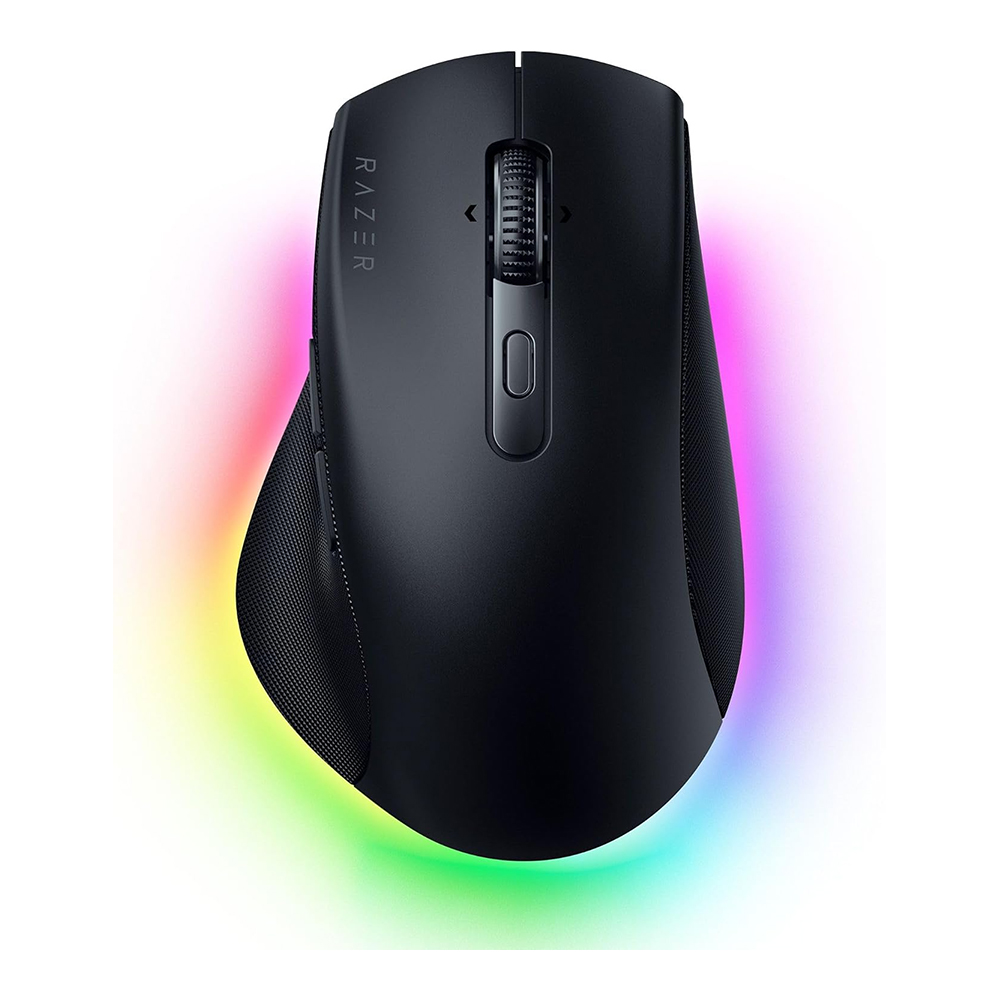
Razer is famous for selling gaming hardware that announces itself from across a room. The Pro Click V2 tries to pass as a civilized office companion. Its curves are restrained, the body is light-colored and the lighting is subdued enough to avoid making a video call look like an arcade. Under that professional exterior sits a gaming-grade optical sensor and a curious software feature that assigns AI actions to a mouse control. After using it across writing, research and creative applications, I found the hardware more persuasive than the promise of automated productivity.
The Pro Click V2 is a premium right-handed mouse built with ergonomic input from Humanscale. It weighs about 110 grams and offers a pronounced thumb support rather than the nearly weightless shape preferred by competitive gaming specialists. Its purpose is not to win a twitch-reaction contest; it is to make a working day feel more agreeable. I liked how it sat in the hand, how smoothly it moved across ordinary surfaces and how readily it switched among computers. The blemishes were smaller: a missing wheel-tilt function and an awkwardly placed device-switch control.
A shape intended to stay in the hand
The mouse has a broadly sculpted surface and a substantial place for the thumb to rest. During extended sessions of editing documents, navigating browsers and manipulating visual material, I found the shape comfortable. The slightly angled support helped the hand settle naturally instead of gripping a featureless oval. That does not establish a measurable health benefit or make the design suitable for every wrist. It means the shape worked for my hand over the time I spent with it, and the physical comfort mattered more than the abundance of software features.
The matte finish and relatively quiet buttons make it appropriate for a desk shared with colleagues. Razer has left behind the most aggressive gaming decoration without abandoning every trace of its identity. Subtle lighting can still appear below the chassis, an aesthetic detail that contributes little to pointer performance but gives the mouse some personality. Compared with overtly gamer-oriented designs, the Pro Click V2 looks as though it belongs beside a laptop and a stack of actual work.
At about 4.9 inches long, the body is not optimized for slipping into a narrow travel pocket. Nor is its 110-gram weight attractive to everyone. A person who prefers an extremely light fingertip mouse may find it substantial. For a stationary desk where the user keeps a hand on the mouse for long periods, those dimensions can be an advantage. The relevant trade-off is between support and portability, a distinction manufacturers too often conceal beneath the catchall word ‘ergonomic.’
The wheel earns more use than the AI button
Razer gives the Pro Click V2 a wheel that can move through distinct tactile steps or spin freely through a long document. I appreciated the choice while reviewing material and moving through large pages. It is a small convenience that becomes habitual quickly. The wheel does not provide left-right tilt scrolling, however, and that omission can be irritating in wide spreadsheets and horizontal editing timelines. Logitech’s MX Master family offers a more elaborate solution to some of those tasks.
The mouse’s optical sensor supports a quoted ceiling of 30,000 dpi, a specification far beyond the needs of ordinary office work. More important, tracking felt dependable when used on different desk surfaces, including glass in my original testing. I did not observe obvious jumps or lag during ordinary navigation. The sensor’s gaming heritage supplies confidence rather than a feature that needs to be consciously exploited. Nobody finishing a spreadsheet needs to move a cursor at the highest advertised sensitivity.
Nine programmable inputs offer enough flexibility for common shortcuts without turning the mouse into a complicated control surface. I found the main buttons and side controls easy to distinguish by touch, and the restrained click sound was welcome. This is a familiar, capable piece of hardware. Its success lies in removing annoyances: moving through long pages, selecting small targets and avoiding a grip that becomes uncomfortable after repeated use.
Three ways to connect, one fiddly switch
The Pro Click V2 can communicate by Bluetooth, a dedicated 2.4GHz wireless receiver or USB-C cable. It can retain pairing information for multiple devices, which is useful to someone moving between a work computer, personal laptop and other equipment. In my testing, switching among paired systems was quick and generally uneventful. The nuisance is that the physical control for selecting devices lives on the underside. Changing machines is simple in principle but requires lifting the mouse and turning it over.
That decision exposes a tension within the design. A mouse intended for professionals who juggle computers ought to make the transition as thoughtless as possible. An underside switch protects the clean top surface and reduces accidental input, but it adds a little interruption each time the user changes systems. For someone who pairs once and rarely moves, this will scarcely matter. A person who shifts among several computers many times a day could find it bothersome.
An AI shortcut is still just a shortcut
Razer’s Synapse software supports a feature called AI Prompt Master, which allows a control to launch an AI-related action. In testing I used a shortcut to summarize selected text, a task that otherwise involved switching applications and invoking a prompt manually. It worked as a convenience. But the software is not making the mouse intelligent, and the quality of the resulting summary depends on the service being used. The hardware supplies a trigger; the model and its associated data practices supply the actual behavior.
That distinction matters in office work. Sending material to an AI service may have privacy or confidentiality implications, depending on the application and account settings. A convenient button does not relieve users of checking where text is sent or whether a work document is suitable for processing. Razer offers extensive remapping and application profiles, and those ordinary controls may be more valuable over the long term than a fashionable AI label.
The recommendation survives without the novelty
Razer advertises battery life running into several months, a claim I did not independently verify through a full endurance test. My shorter period of use showed little drain, and USB-C provides a straightforward charging route. The strongest reasons to choose the mouse remain its comfortable right-handed shape, consistently good tracking, useful wheel and flexible wireless connectivity. The reasons to hesitate are the lack of wheel tilt, the underside pairing switch and the premium price.
The Pro Click V2 shows that a gaming company’s experience with sensors and switches can produce a respectable office accessory. It feels thoughtfully built and was consistently agreeable during writing, research and image work. Its AI shortcuts are interesting, but I would not buy the mouse because of them. I would buy it because the device made a desk feel more comfortable and more predictable, with only a few small interface decisions standing between it and an unqualified recommendation.

