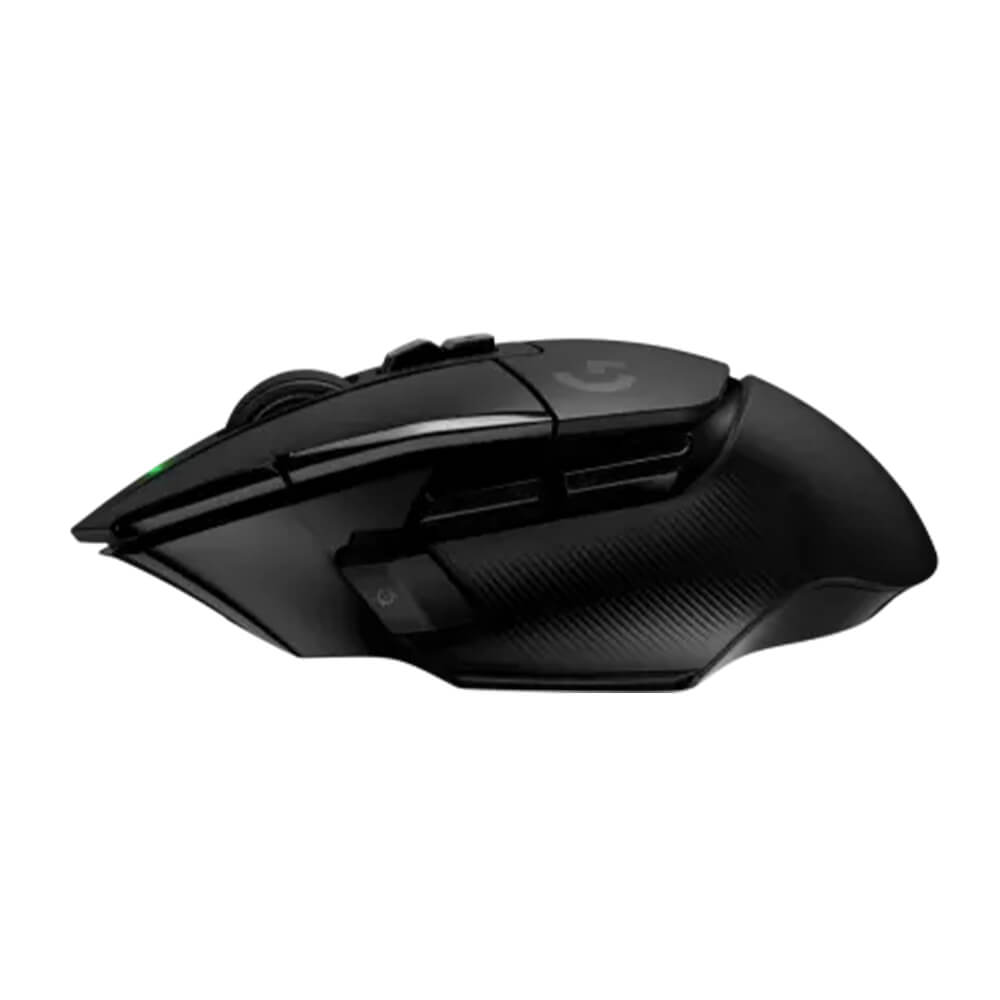
The mouse industry has become obsessed with shedding grams. Competitive models parade weights that would once have sounded implausible; hollow shells and sparse controls promise faster flicks and less fatigue. Logitech’s G502 X Lightspeed comes from a contrary tradition. Its sculpted body carries a thumb shelf, a conspicuous collection of buttons and a wheel capable of two entirely different personalities. At 102 grams in the original black version, it is nobody’s idea of an ultralight. After using it extensively for gaming and the less glamorous labor of writing, I found that was part of the attraction.
The G502 X does not pretend everyone uses a computer in the same way. A player shifting rapidly between weapons needs precise inputs; a writer skimming a long document needs to travel hundreds of lines without wearing out a fingertip. Most mice serve one task well and tolerate the other. This one makes a more expansive argument. The question is whether a larger, busier design can become a convenience rather than a burden.
The wheel is the reason to keep it
A conventional mouse wheel is a wonderfully economical invention, until you have to cross a 70-page document. Logitech supplies a mechanical switch between two behaviors. With the wheel engaged, each small turn advances through distinct steps. Release it and the wheel spins freely, sending a long webpage racing past with a single motion. The wheel also tilts left and right, giving it two additional assignable commands. Over long sessions of reading, research and editing, I used the change of pace more often than any of the mouse’s showier gaming functions.
The point is not that free-spinning wheels are new. It is that this one makes the transition unusually easy and gives both modes a proper job. Precise scrolling is useful in a list or settings panel, while the unrestrained version is well suited to draft manuscripts, source material and endless browser results. If you spend much of your time crossing from one sort of navigation to the other, a mouse that encourages the change can feel more helpful than a marginally lighter one.
An unapologetically right-handed design
The G502 X has a pronounced thumb rest and a body shaped for a right-handed grip. In my testing the mouse settled comfortably into the hand through long periods of ordinary desktop work, and its mass did not become an annoyance. That is a personal result, not a guarantee about your anatomy. Someone with smaller hands, a left-handed setup or a preference for fingertip grips may find the same contours restrictive. This mouse wants to support the palm and offer a place for nearly every finger.
The shape also explains why it feels different from Logitech’s leaner competitive mice. A symmetrical 59-gram model can be moved rapidly with less effort and may suit repeated lifts. Here, the emphasis is on a secure grasp and numerous reachable functions. Those are legitimate priorities in strategy games, complex applications and ordinary office work. The right question is not whether 102 grams is ‘too heavy’ in the abstract, but whether the design makes you less comfortable or less efficient during your actual routine. In my case it did neither.
Buttons everywhere, but not randomly
Logitech counts 11 physical buttons and 13 programmable controls, the latter including functions available through the wheel. The main clicks use LIGHTFORCE optical-mechanical switches, designed to register input through optical actuation while retaining the more familiar tactile sensation of a mechanical click. I found the buttons quick and agreeable during games. The benefit for everyday work was equally apparent: the extra controls can replace repetitive keyboard shortcuts or help move among applications without interrupting a train of thought.
One small piece of mechanical intelligence is the removable DPI-shift control positioned near the thumb. Logitech lets the user reverse its orientation or replace it with a blank cover. That matters because the button is useful only if it is accessible without becoming an accidental trigger. A control located perfectly for one person’s thumb can irritate another. The ability to reconfigure a physical button is a more consequential adjustment than a decorative lighting preset.
Logitech G Hub manages sensitivity, mappings and application profiles, and the mouse can store up to five onboard profiles. All that customization can feel disproportionate if your only ambition is to move the pointer. It becomes more appealing when the mouse crosses between software with different demands. You might assign a set of commands for gaming, another for moving through editing tools and a third for general work. I would begin with just a couple of assignments and add others only when they solve a recurring annoyance.
Fast wireless without the Bluetooth safety net
The mouse connects through Logitech’s dedicated LIGHTSPEED 2.4GHz receiver, not Bluetooth. In use, movement and clicks felt immediate; I encountered no reason to distrust it during gaming or ordinary research and writing. Logitech’s HERO sensor has appeared in more than one hardware generation of the G502 X, so buyers should check the exact revision rather than assume that a single published DPI figure describes every unit. What I can report from my tested hardware is responsive, consistent behavior, not a laboratory latency measurement.
The lack of Bluetooth is a genuine limitation. A dedicated receiver can be a sensible way to prioritize performance, but it occupies a USB port and is one more small object to lose when traveling. Someone alternating regularly among a laptop, tablet and desktop may prefer a mouse with several connection modes. A stationary gaming machine is less likely to expose that drawback. Wireless convenience depends on the life around the computer, not just the absence of a cable.
Battery life is a claim until it is measured
Logitech rates the original G502 X Lightspeed for up to 140 hours per charge. The mouse uses USB-C and can operate while plugged in. It also supports Powerplay charging through a compatible mat purchased separately. I did not complete a controlled 140-hour battery rundown, so it would be misleading to attach that figure to a personal test. The practical advantage is simpler: a conventional wired connection is available when necessary, and a specialized charging surface is a luxury rather than a requirement.
The original $159.99 list price, subsequently discounted by some retailers, makes the buying decision less trivial. There are very good mice for considerably less, and dedicated ultralight models may be more suitable for competitive players whose priorities begin and end with rapid physical movement. But the G502 X Lightspeed is unusually coherent in its own way. It is a mouse for people who do several different things on a computer and want an elaborate input device that earns the complexity. The wheel alone was enough to remind me why lighter is not always better.

