HANDS-ON / HARDWARE REVIEW
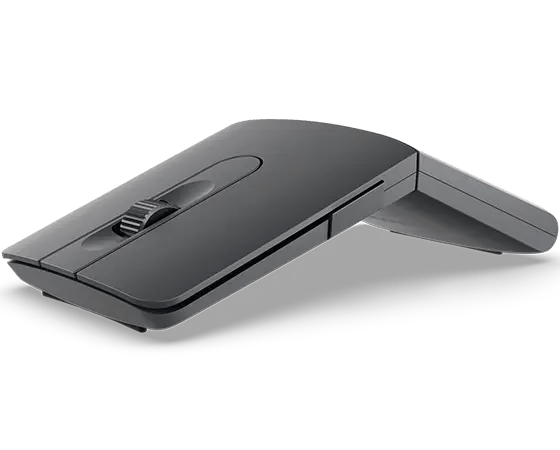
I tested Lenovo’s ThinkPad Bluetooth Presenter Mouse for a PCMag assignment, and it raises an entertainingly specific question: who needs a mouse that turns into a presentation remote? Lenovo is betting there are enough people who move between a desk and a conference room to make such a hybrid worthwhile.
The trick is physical. Rotate the mouse and it changes from a low-profile pointing device to a slender presenter. The software adds a digital pointer, highlighting and magnification tools. Rather than carrying a second gadget in a laptop bag, the idea is to make one modest object cover two kinds of work.
Two devices, one compromise
Lenovo lists the Aura Edition as 106.2 millimeters long and 30 millimeters high in mouse mode, collapsing to roughly 14.9 millimeters thick in presenter mode. It weighs about 60 grams. The design promises a lighter travel kit, but a device built to accommodate two shapes necessarily has different ergonomic priorities from a full-size desktop mouse.
It supports two Bluetooth connections, Microsoft Swift Pair and a scroll wheel that automatically changes between tactile and free-spinning modes. The built-in optical sensor has three hardware settings: 1,200, 1,600 and 2,400 dpi, with software adjustment to 4,000 dpi. Lenovo also includes a dedicated AI button, though exactly how useful it is depends on the connected Windows setup.
The questions worth asking
While finishing my earlier review, I specifically pressed Lenovo to clarify the product’s dimensions, sensor, software tools, battery, operating-system support and warranty. The answers matter more than the novelty of a mouse that twists. Lenovo’s published support materials specify Windows 10 and 11, a rechargeable battery, about two hours for a full charge and a three-year limited warranty.
One caveat in the documentation is instructive: Lenovo’s overview advertises up to two months of use per charge, while another technical section has listed up to six months. Neither figure should be treated as a verified result from my own tests. The company also advertises high recycled-material content, with 95% post-consumer recycled material overall.
Who it is for
This is not the obvious mouse for someone who never leaves a desk. Its appeal is more particular: frequent presentations, travel and a preference for fewer objects in the bag. The central question isn’t whether a clever mechanism exists; it’s whether presentation controls are frequent enough in your working life to justify the compromise in mouse shape.
I like the fact that Lenovo tried to solve an actual problem rather than simply adding another blinking light. Whether it is a good purchase depends on how often you need its second identity.
Product: ThinkPad Bluetooth Presenter Mouse (Aura Edition), model 4Y51T62792. Source: Lenovo’s published specifications and service guidance.
Disclosure: Lenovo supplied a replacement loan sample for an earlier PCMag review assignment. This is a newly written article, not a republication of PCMag’s review. I have not invented benchmark data or a score that I cannot substantiate.

