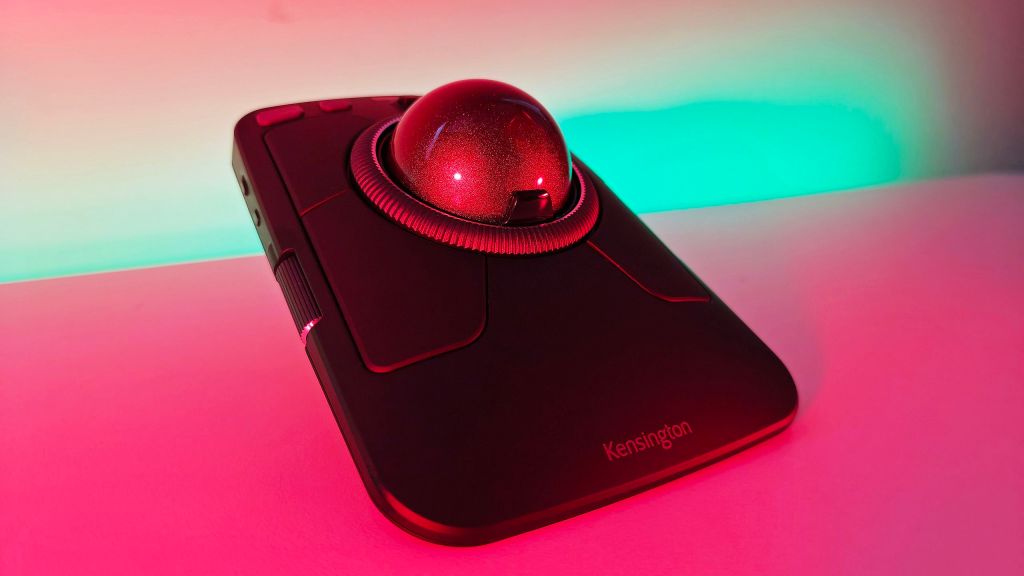
The most revealing moment in testing Kensington’s Expert Mouse Pro TB900 EQ came when I instinctively tried to move the whole device across my desk. It weighs nearly a pound and has no intention of going anywhere. The cursor is controlled by a large red ball, not by sliding a mouse over a surface. Once I stopped trying to move the chassis, the appeal became clearer. A modest roll sent the pointer across a large display; a careful fingertip adjustment placed it where I wanted. The transition required some relearning, but the reward was a surprisingly capable way to work without moving my entire hand around the desk.
At $129.99, the TB900 EQ is not an inexpensive experiment with alternative pointing devices. It is a large, elaborate controller with eight buttons, a ring around the central ball and two additional rotary controls mounted on the sides. It supports several connection methods and extensive customization. Kensington is targeting people who regard their mouse or trackball not as a disposable accessory but as an integral part of a working setup. The abundance is appealing, although nobody should feel obliged to assign a function to every control on the first afternoon.
A giant ball surrounded by possibilities
The basic geometry recalls Kensington’s earlier Expert Mouse trackballs: a broad, nearly square body with a 55-millimeter ball in the middle. The trackball sits high enough to be controlled with the index and middle fingers, rather than the thumb-operated design familiar from some Logitech models. A quick sweep across the large ball can move the pointer a substantial distance, while small motions permit more precise placement. I preferred the extra surface area when navigating a large desktop. It felt less like pinching a small control and more like directly manipulating the cursor.
The chassis measures roughly 4.9 by 6.5 inches and stands about 2.4 inches high with the ball fitted. Those are not dimensions for a travel bag. The large body also changes the conventional way of thinking about desk space. Although it occupies a sizable patch of the desktop, it does not need the surrounding clearance that a mouse needs to move. On a desk crowded with notes, cables and other equipment, that can be an unexpected advantage. The weight helps keep everything planted as the ball turns.
Kensington’s symmetrical shape allows use with either hand, a welcome feature in a market filled with premium right-handed peripherals. The company does not include a detachable wrist rest, something owners of older Expert Mouse designs may miss. I did not find that absence especially troublesome during normal use, but the position of a trackball relative to the keyboard, the desk height and the user’s hand size will affect comfort. This is not a medical intervention or an automatic cure for discomfort; it is an alternative way to issue the same familiar computer commands.
The scrolling ring is the quiet triumph
A broad scroll ring surrounds the ball. Instead of repeatedly flicking a small wheel, the user can turn the ring through a generous arc while leaving the hand in much the same position. I particularly enjoyed it when moving through long articles, web pages and editing documents. The relationship between cursor and scrolling controls felt coherent: both are immediately adjacent and can be operated with small movements rather than a reach toward a separate control. It took very little time for this arrangement to become one of my favorite parts of the device.
The two rotary side controls add a more eccentric kind of convenience. Horizontal scrolling is an obvious use, as is zooming within an image or moving along a video-editing timeline. All these functions are continuous, and a dial feels more appropriate than repeatedly tapping a button. In an ordinary email inbox, however, the controls may be largely unnecessary. The TB900’s abundance makes sense only when the owner has recurring tasks that benefit from putting several specialized actions under one hand.
I found it best to build a set of assignments slowly. The first shortcuts were obvious: Back and Forward in a browser, Undo and Redo while editing, perhaps a rotary control for horizontal navigation. More complicated assignments became useful only after the basics felt automatic. A shortcut should not force you to look down and think about its location. The temptation to program every visible control immediately is understandable and counterproductive. Kensington supplies more possibilities than most people can absorb in one sitting.
Why the pointer feels so different
Kensington uses a dual-sensor optical tracking system and advertises a polling capability of up to 1,000Hz. Those figures describe how the hardware is designed to observe the ball and send information to the computer, but the practical impression is more straightforward. In my testing, cursor movement was smooth, with no noticeable tendency to stumble across a large display. Large rolls took me across the screen quickly, and small fingertip movements gave the precision needed to position a cursor over a particular interface element.
Sensitivity is especially important with a trackball. With the pointer speed set too low, I found myself rotating the ball repeatedly just to cover an ordinary distance. Raising it improved the relationship between large movements and careful corrections. A conventional mouse also benefits from appropriate sensitivity, of course, but the different input method made the adjustment more consequential here. The settings were part of learning the device, not merely polishing the experience after it was already familiar.
The process of adapting was occasionally comic. I initially caught myself trying to slide the entire device as though it were an ordinary mouse, only to be reminded by the heavy chassis that it was meant to stay in place. The habit faded relatively quickly. Achieving the exact confidence and automatic accuracy I had developed over years with a mouse took longer. That is a real barrier to switching input methods and deserves more attention than a theoretical comparison of tracking specifications.
Several computers, one controller
The TB900 EQ supports wired USB-C, a 2.4GHz wireless receiver and Bluetooth connections, allowing a total of four connection channels. That versatility makes sense for a large device that is likely to remain on the same desk while the computers around it change. A desktop can use the receiver, a laptop can use Bluetooth and the cable remains available for a direct connection or charging. I had no noteworthy connection problems during my testing. The flexibility felt like an appropriate counterpart to the product’s otherwise stationary nature.
Kensington rates the rechargeable battery for up to four months under its own test conditions. I did not conduct a four-month run-down, but the use of USB-C means the device can continue operating while being charged. For equipment that does not travel much, being able to fall back to a wire is more useful than a claim about an exceptionally long but unverified battery runtime. It also removes some of the pressure to manage a separate supply of disposable batteries.
Software is central, rather than optional
Kensington’s configuration software allows the user to remap buttons, change scrolling behavior and create different assignments for different applications. That is important because the hardware’s complexity is its selling point. A web browser can use one set of controls, a spreadsheet another and a visual-editing application a third. I enjoyed the ability to make the side dials perform tasks that otherwise demanded keyboard shortcuts. The device gradually became more useful as those assignments turned into habits.
The arrangement also imposes a learning curve. Some input devices work perfectly well with their factory settings and gain very little from customization. The TB900 is functional out of the box but does not realize its full potential until you have thought about how to use the controls. That makes the purchase less attractive for somebody who wants a point-and-click accessory requiring absolutely no setup. It is more like an instrument that rewards practice than an object intended to be invisible from day one.
A trackball for people who have a desk
The most persuasive comparison is with the thumb-operated Logitech MX Ergo family. Both allow the pointer to move while the device stays in place, but the technique differs. A thumb trackball resembles a conventional mouse with the motion delegated to one digit. Kensington’s big central ball gives the index and middle fingers more room to work and surrounds the action with substantial additional controls. Neither is inherently superior. The choice depends on hand preference, the kinds of commands being repeated and how much desktop space is available.
I would not buy the TB900 EQ chiefly for gaming, even though its responsiveness makes casual use possible. Competitive gaming mice are optimized around repeated physical movement, low weight and a much simpler set of controls. Kensington’s product is aimed at spreadsheets, timelines, image work, writing and other tasks where assigning shortcuts can reduce repetitive movement between mouse and keyboard. Its very weight and size, drawbacks for travel, become features when the trackball stays put beside a monitor.
The Expert Mouse Pro TB900 EQ is expensive, large and initially unfamiliar. Those disadvantages are real. But its ball was easy to control once I adjusted, the scrolling ring was excellent, and the dials proved genuinely useful when I gave them appropriate jobs. There is something satisfying about a product that does not pretend to be for everybody. Kensington has built a very elaborate piece of desktop equipment for people prepared to learn it. In that specific context, the excess feels less like gadgetry and more like control.

