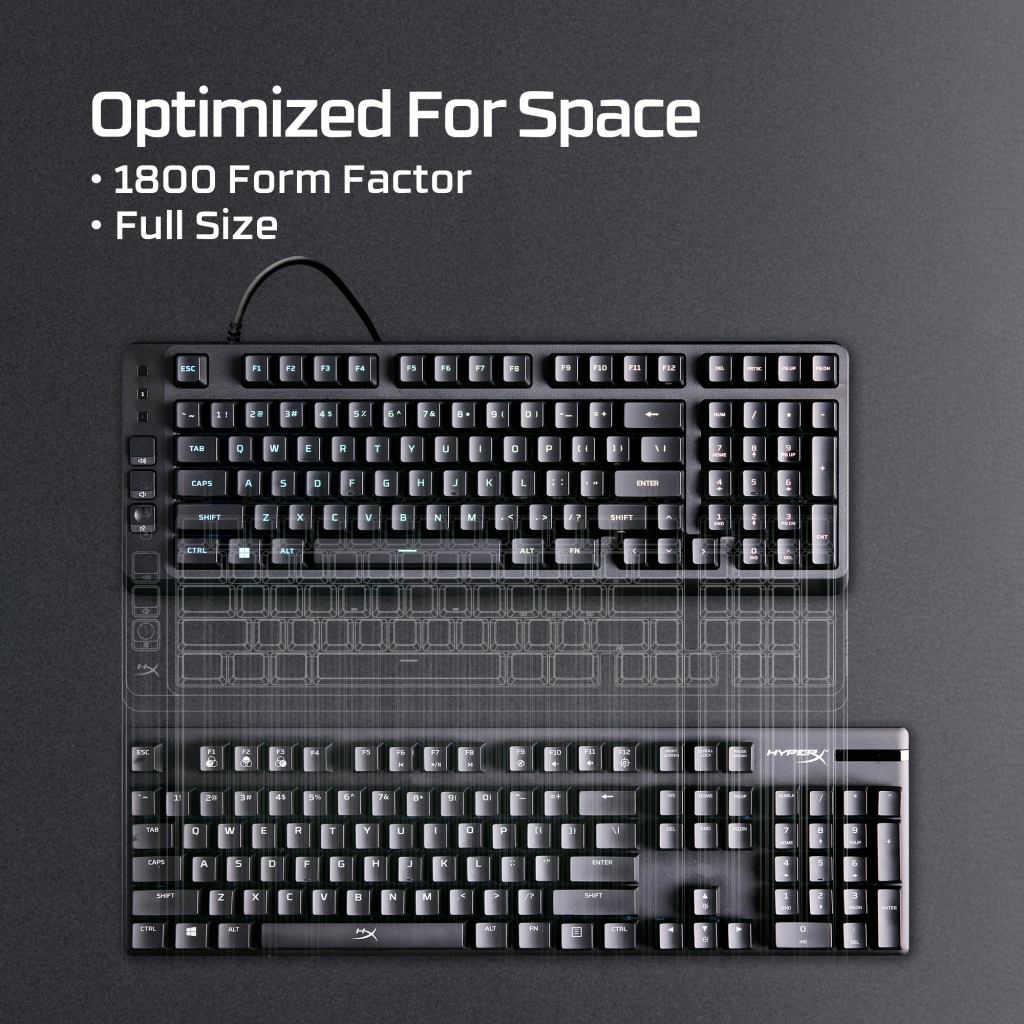
For the first two days with the HyperX Eve 1800, I kept reaching for the A key and finding Caps Lock instead. There was nothing wrong with the switch. HyperX had placed an extra column of media controls along the left edge, nudging the conventional typing area slightly to the right. My hands, accustomed to decades of keyboards that begin in roughly the same place, had not received the memo. By the third day the mistakes were less frequent. They never quite stopped being something I had to think about.
That is an unusually revealing problem for a budget keyboard. The Eve 1800 costs $49.99 and offers a great deal for the price: a compact layout with a numeric keypad, muted membrane switches, configurable lighting and useful media buttons. I used it for several days as my primary keyboard for writing and games. The fundamental experience was comfortable enough, sometimes impressively quiet, and occasionally irritating in a way no specification chart would reveal. It is a product whose best and worst features share the same design decision.
A compact keyboard that isn’t very compact
The name refers to the 1800 layout, a compressed full-size arrangement often described as 96 percent. It keeps the number pad, function keys and arrows but removes much of the empty space between them. That makes the board narrower than a conventional full-size keyboard, while preserving the numeric entry that many small layouts discard. HyperX quotes a width of roughly 16.1 inches. It saves some space, although a tenkeyless or 75-percent keyboard still leaves appreciably more room for broad mouse movements.
The idea is sensible for people who need both a number pad and an ordinary place to work. I understood the appeal during writing sessions and while navigating games. The complication is that HyperX did not simply compress familiar keys. It added a narrow column of volume-up, volume-down and mute buttons at the far left. Those controls are useful because they can be pressed without holding a function modifier, but they move the tactile starting point of the keyboard away from where muscle memory expects it.
I adjusted over several days, yet the experience stayed less automatic than with conventional boards. That might be a temporary nuisance for somebody who will use the Eve exclusively. It becomes more consequential for a person moving among a laptop, an office keyboard and a gaming setup. An input device should ideally disappear during typing. Here I found myself noticing the layout even after becoming familiar with it. The media column solved one small inconvenience by creating a different one.
Membrane keys in a mechanical-keyboard world
The Eve uses membrane switches rather than individual mechanical switches. They are soft, slightly cushioned and impressively quiet, with a muted sound as the keys bottom out. For a shared room or late-night writing, that can be an advantage. I completed long typing sessions without finding the keyboard physically fatiguing. The keycaps and chassis are modest, as expected at this price, and there is some flexibility in the mostly plastic body. None of this made it feel as though it were about to break during routine work.
Precision is where the compromise emerges. Mechanical switches often provide a clearer sense of the point at which an input has registered, whether through a tactile bump or a predictable linear movement. The Eve’s softer response felt less distinct, especially when I typed rapidly. I occasionally found myself reducing my pace to maintain the rhythm I wanted. That is not proof of a slow electronic response; it describes what the mechanism felt like beneath the fingers. Comfortable and precise are not synonyms.
At $50, this distinction matters more than it once did. Entry-level mechanical keyboards have become inexpensive enough that the Eve cannot rely on price alone. A buyer can spend somewhat more and obtain a different switch feel, sometimes with replaceable mechanical switches and more elaborate lighting. The Eve’s defense is that not everybody wants a clattering or sharply defined typing experience. Some people will prefer quiet, familiar membrane keys, especially when the board shares space with other workers.
Games reveal the soft edges
The gaming label is not entirely decorative. HyperX includes a game mode designed to prevent accidental Windows-key interruptions, 12-key rollover and anti-ghosting support for simultaneous inputs. During ordinary use I did not encounter obvious phantom presses or missing commands. Strategy games and less frantic sequences were generally unremarkable in the positive sense: the keyboard handled the controls and allowed me to concentrate on the software.
Fast-paced shooters were more revealing. Rapid directional changes and repeated key inputs felt softer and less precisely defined than with mechanical keyboards I have used. The difference was not enough to make a game unplayable, but it undermined the sense of control that competitive peripherals are supposed to cultivate. The issue was largely tactile rather than an electronic latency measurement. If a buyer spends most gaming hours in demanding competitive titles, a mechanical alternative may be worth the additional cost.
The lighting is sensible, with limits
The Eve includes ten-zone RGB lighting instead of individual illumination under every key. The effect is pleasant enough to bring a dark keyboard to life, and the colors are visible under ordinary room lighting. It is not the elaborate per-key light show offered by costlier models. HyperX provides presets and customization, but anyone hoping to paint intricate patterns across the board will quickly reach the limits of zone-based lighting. At this price, the compromise makes sense.
The media controls are another mixed blessing. Having dedicated volume buttons is convenient, especially when a game or video is running full screen. The buttons themselves felt somewhat mushier than I wanted, and their position was the reason the rest of the keyboard disturbed my typing rhythm. Their value depends on how often you adjust sound and how quickly you adapt to a different left edge. A frequent audio adjustment is useful; a recurring mistyped letter is not.
The bargain makes a narrow kind of sense
HyperX has assembled a decent collection of features around a quiet, comfortable keyboard. The Eve 1800 gives an inexpensive PC setup a numeric keypad, some lighting and basic gaming functions without demanding a substantial purchase. It will be good enough for schoolwork, email, occasional gaming and desks where noise matters more than key feel. It is harder to recommend to people who write for hours or repeatedly switch among conventional keyboard layouts. The left-side controls were a small but persistent friction in my use.
I would not call the Eve a bad keyboard. Its price is reasonable, its membrane switches were pleasant during unhurried typing and its gaming features operated without drama. But a modern $50 board faces real competition from affordable mechanical designs, and the details of its own layout make an ordinary task unexpectedly awkward. The curious thing about this product is that the mistake I kept making was not caused by poor manufacturing. It was caused by an attempt to make the keyboard more convenient.

