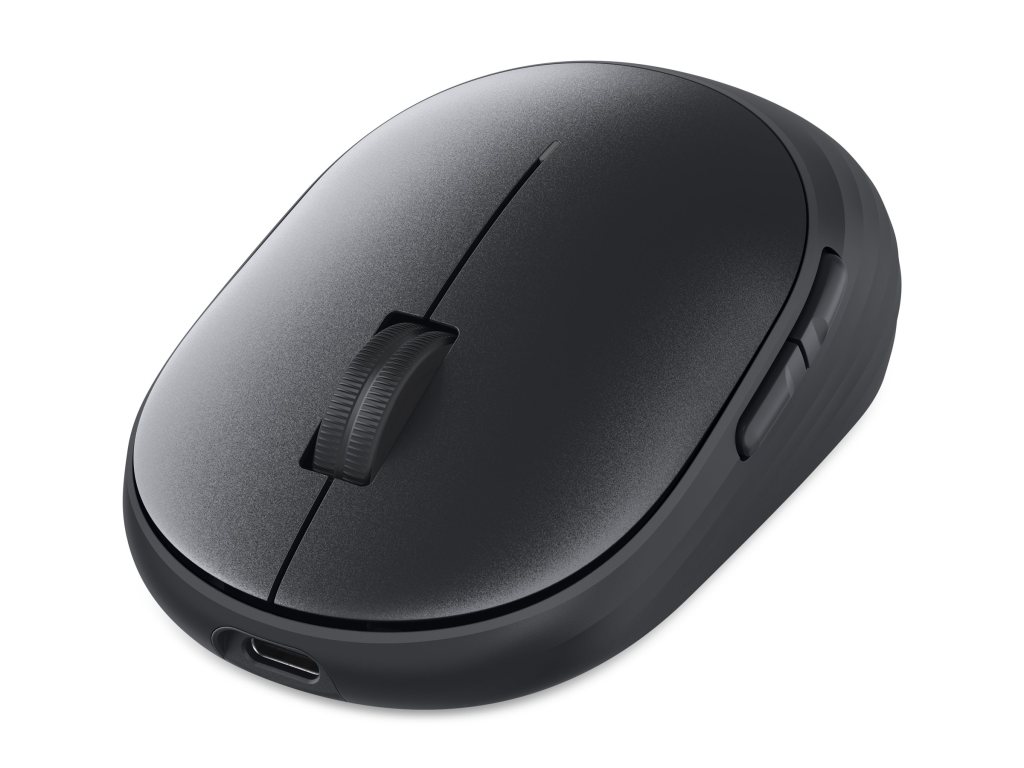
A mouse that spends its life on an office desk does not need the performance theatrics of a competitive gaming accessory. It should move the pointer, click when asked and avoid behaving like a maintenance project. Dell’s Pro 7 Rechargeable Compact Mouse approaches that brief almost aggressively. The MS746 is small, symmetrical and plain, but it trades a conventional battery for a supercapacitor and adds an encrypted wireless receiver. After using it for the persistent work of research, drafting and moving among windows, I found its restraint more convincing than its list of headline claims.
The $44.99 mouse is better understood as a workplace tool than a gadget to show friends. Its quiet clicks and 2.8-ounce weight are easy to appreciate. Its supercapacitor is more complicated: an interesting component whose benefits accrue over repeated charging and perhaps years of ownership. Dell’s more dramatic promise is that just five seconds on a cable can provide enough power for a day, under the company’s conditions. I did not run a stopwatch test to authenticate that claim, so it remains a manufacturer specification rather than a feat I personally witnessed.
A battery substitute with an institutional audience
Conventional wireless mice frequently rely on disposable cells or built-in lithium batteries. The first must be replaced; the second gradually loses capacity. Dell’s supercapacitor stores energy without the same electrochemical process. In principle that allows a great many charging cycles and quick replenishment. It is a promising way to make a small, cheap peripheral less dependent on consumable parts. But it does not exempt the buttons, sensor or scroll mechanism from wear, and the full lifespan advantage would require years of observation to establish.
Dell rates the MS746 for around a month and a half on a full charge. Charging takes place through USB-C, and the fast top-up claim is especially attractive when a meeting or deadline is approaching. The emphasis is different from the hundred-hour statistics advertised on gaming mice. Dell wants the charging process to be so inconsequential that power stops occupying much mental space. For a business that manages many desks, fewer battery replacements could become a substantial practical benefit.
Small enough for a bag, maybe too small for a hand
The body is roughly 4.2 inches long, 2.5 wide and 1.5 high. It looks compact because it is compact, with a low, symmetrical profile rather than the deeply molded palm support of larger productivity mice. During days of drafting articles and switching through research, I found it comfortable enough and easy to control. But someone with large hands who habitually rests the entire palm on a mouse may find the shape less supportive. The same dimensions that make it a logical traveling companion limit how it feels during an eight-hour desk session.
The quietness of the main buttons is a genuine pleasure. An input device need not announce every press to the rest of the room. The MS746’s clicks were subdued without leaving me uncertain whether a command had registered. Its optical tracking was smooth during routine work, and I did not encounter noticeable connection interruptions at normal desk distances with the receiver. These are unglamorous observations, but consistency is what makes a mouse disappear into a routine.
The case for a compact, symmetrical design is not universal. Users with specific comfort preferences may prefer a more contoured right-handed shape, a vertical mouse or a trackball. Nor does symmetry by itself make a product equally suitable for every hand. I would treat the Dell as an ordinary, convenient pointing device rather than a specialized ergonomic solution. It does not claim to reposition the entire wrist, and it should not be praised as if it did.
A secure link, with compromises attached
Dell offers both Bluetooth and a dedicated Secure Link receiver, describing encrypted wireless communications. For a personal computer at home, that may sound more impressive than necessary; for a managed corporate environment, it is a more tangible purchasing consideration. The receiver provides a defined connection method within a fleet, while Bluetooth helps when a USB port is unavailable. Switching between multiple computers is possible, but the experience remains governed by the configuration and available pairing controls.
The sensor supports adjustable sensitivity up to 6,000 dpi, a figure far beyond what most people need to navigate a spreadsheet. More important is that ordinary cursor movement felt predictable during writing and research. Dell includes five buttons in total, but only three are programmable. That was the limitation I encountered most often. A mouse used across documents, browser tabs and editing tools can quickly develop a need for extra shortcuts. The MS746’s sparse control scheme leaves little room for those habits to grow.
Configuration software also favors Windows. A basic pointer should remain usable on macOS or Linux, but specialized button adjustments may not be available through the same interface. This is a familiar problem with peripherals sold into mixed-device offices. A product can claim broad compatibility for its essential functions while leaving the most appealing conveniences dependent on one platform. Read the distinction carefully if the mouse will alternate between a company PC and a personal laptop.
The physical cost of simplicity
The light body has an understandable appeal during travel, and the subdued styling will not disrupt a neatly arranged office desk. Dell says the shell uses a significant percentage of recycled plastic and offers a three-year limited warranty with advanced exchange. That combination gives the device a plausible long-service-life argument, though one would need prolonged use to establish whether the switches and supercapacitor actually outlast an ordinary office mouse.
There is also the matter of what the MS746 does not try to be. It is not a gaming mouse with high polling rates and elaborate software. It is not a sculpted productivity controller with dozens of shortcuts and an extravagant scroll mechanism. It is a basic mouse whose most interesting technologies are dedicated to the boring questions of charging and secure communication. That may be precisely the right place for innovation in a product category that has already solved accurate pointer movement rather well.
I came away impressed by how little attention the MS746 demanded. It was light, quiet and accurate in the routine tasks I actually performed, with the connection staying steady at my desk. The missing programmable controls remained the irritation, and the compact shell will not fit every hand comfortably. At $44.99, the calculus depends on whether the supercapacitor and encrypted link matter more than extra buttons. For a managed office, that is a persuasive trade. For an individual who lives on custom shortcuts, less so.

