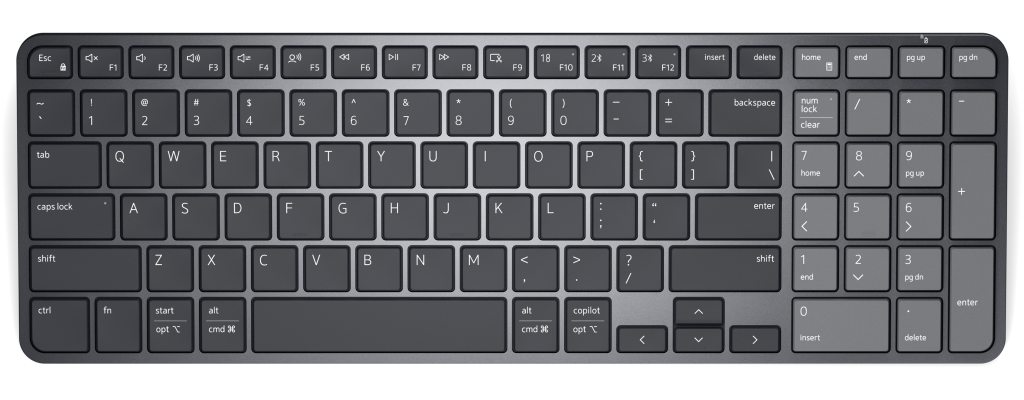
Dell’s Pro 7 Rechargeable Compact Keyboard does not look like the future of anything. It is gray, flat and quiet, with the polite proportions of equipment bought by the hundred for offices where nobody wants to think about keyboards. Under the keys, though, sits an unusual power source: a supercapacitor in place of an ordinary rechargeable battery. It is a piece of engineering that probably deserves more attention than the machine’s entirely conventional appearance. After using the KB746 for long stretches of writing and correspondence, I thought the keyboard’s most compelling achievement was that I scarcely noticed it at all.
The catch came when I worked late with the room lights low. There is no backlight, a decision that seems needlessly stern for a $59.99 product that otherwise tries to remove everyday friction. The keyboard is aimed at office administrators and people who would prefer their peripherals to disappear into the surroundings. But removing the need to replace batteries while making the keys harder to see is an odd trade to impose on anyone who works beyond daylight.
Power without a conventional battery
Most cordless keyboards store energy in disposable cells or a rechargeable lithium battery. Dell instead uses an embedded supercapacitor, which stores electrical energy differently and can tolerate many charge cycles. The company says a full charge can last roughly three months under its conditions, with charging done through USB-C. That endurance claim should not be mistaken for the result of a three-month experiment here. Its practical attraction is more mundane: a power system designed to recharge rapidly and to age differently from the rechargeable cells found in most competing keyboards.
A supercapacitor is not a guarantee that the entire keyboard will last indefinitely. Keys can fail, wireless hardware can become obsolete and mechanical wear continues regardless of the power source. The component does, however, address a familiar weakness in sealed electronics: a declining battery can render an otherwise satisfactory device less useful. For an IT department managing a fleet, fewer disposable cells and potentially fewer failing batteries can be valuable. A single home user may appreciate the idea without ever noticing that benefit in the budget.
Better to type on than to admire
The KB746 uses a low-profile scissor mechanism similar in character to that of a decent laptop. I typed emails and worked through substantial documents, and found the action consistent and agreeably quiet. The key travel is shallow but not entirely vague. A light tactile response gives the fingers enough information to sustain a reasonable rhythm, while the sound is subdued enough to be useful around colleagues or on calls. There is no pretense of enthusiast-keyboard personality, and in this case I considered that a virtue.
The body measures roughly 14.2 inches across and weighs a little over a pound. It provides a familiar main typing layout without the dedicated number pad found on a larger full-size keyboard. That saves horizontal space, a small but real gain when the desk also holds a mouse, papers and a cup of coffee. The flip-out feet give the board a different angle, and the plastic chassis felt adequately secure during ordinary use. It is not a luxurious object, but it does not need to be one to work well.
There is a small distinction between a keyboard that feels comfortable for ten minutes and one that remains pleasant through a full afternoon. The Dell belonged to the latter category in my sessions. I did not find myself fighting the layout or wishing for dramatically deeper switches. This is not proof of a medical ergonomic benefit; it is the relevant firsthand observation for the work the manufacturer claims the keyboard is built to do. The quietness is an especially concrete advantage in a shared space.
The security pitch is directed at institutions
The KB746 connects using Bluetooth or Dell’s Secure Link USB receiver, with Dell advertising 128-bit AES encryption for the wireless connection. That is not the sort of feature that normally attracts individual keyboard shoppers, but wireless interception is a legitimate consideration in managed corporate environments. Dell also offers thirteen programmable keys and software controls targeted at Windows. For a workplace deploying many devices, a common configuration can matter more than the possibility of assigning elaborate macros to a game.
That emphasis makes the keyboard’s priorities easier to understand. Multi-platform compatibility is listed for basic keyboard input, while the customization software is Windows-centered. An employee with a Mac may still type on it perfectly well and miss out on some controls. A worker accustomed to a backlit laptop keyboard is likelier to encounter the hardware omission at night. This is where the administrative and individual versions of ‘productivity’ can part company: reducing IT maintenance is not the same as improving every small part of a person’s day.
The $60 question
Dell says the board uses substantial post-consumer recycled plastic and backs it with a three-year limited warranty with advanced-exchange service. Both are meaningful purchasing details in an enterprise setting. They are also unlikely to console somebody who needs a numeric keypad for repetitive data entry or a backlight for late working sessions. There are less expensive keyboards with more conspicuous features. The KB746 asks buyers to value power design, secure connectivity and typing restraint above things that are immediately visible.
An office keyboard ought to be judged by what happens when the work becomes tedious. A good one stays quiet, registers input predictably and makes few demands on the person using it. The Dell achieved that in my time with it. Its scissor keys were comfortable and close to silent, the compact dimensions made sense on a working desk, and the supercapacitor offered a plausible long-term advantage. But leaving off the backlight in a product this considered feels like a curiously avoidable mistake.
I would choose the KB746 for a security-conscious office or a person who prizes a simple, quiet keyboard and wants less concern about power cells. I would skip it for a workstation devoted to numerical entry, for a dark room or for someone who expects deep software customization across operating systems. Its most attractive engineering remains hidden inside, and its most conspicuous flaw reveals itself only when the lights go down. That is a peculiarly Dell sort of bargain.

