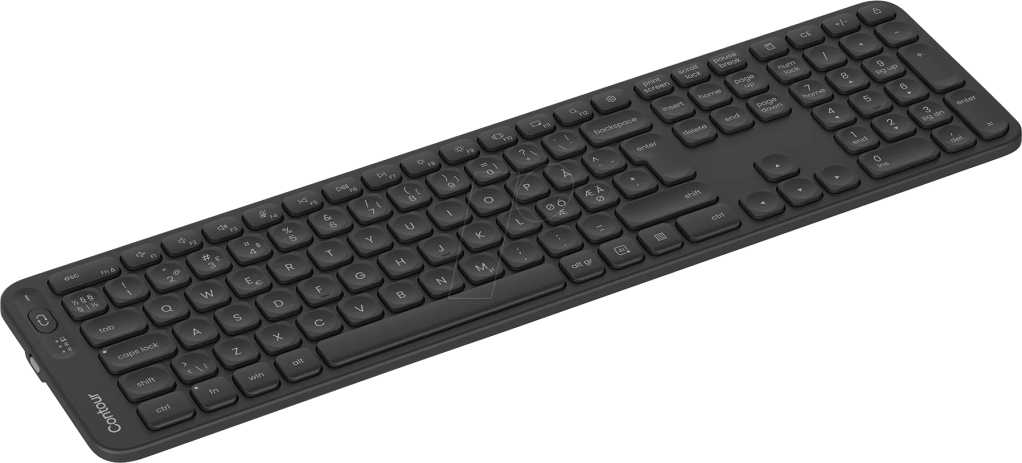
Contour Balance keyboard. Product image: Contour / retailer.
A keyboard can look perfectly conventional and still ask you to change a habit built over decades. Contour’s Balance Full-Size Wireless has the familiar rows of letters, a numeric keypad and the shallow outline of office equipment. What makes it different is underneath. Its feet allow the board to slope away from the user, rather than merely rise toward the back as ordinary keyboard supports do. That negative-tilt option sounds like an obscure ergonomic detail. After using the Balance, I thought it was the strongest reason to consider the $109 keyboard.
The product is intended to work alongside Contour’s centered pointing devices, such as the RollerMouse, but it does not depend on owning one. As a standalone keyboard, it offers quiet scissor-switch typing, wireless pairing with several devices and a respectable set of shortcut controls. It is not especially luxurious or radical in appearance. Its distinctive proposition is that a productive desk should accommodate the position of the hands, rather than demand that the hands accommodate the traditional angle of a keyboard.
The interesting feature is below the keys
Most keyboards ship with little feet that lift the rear edge. That familiar position makes the key labels easier to see, but it also raises the rear of the typing surface relative to the hands. Contour permits several positions, including a negative tilt that reverses the relationship. For some desk arrangements, especially ones where the keyboard is relatively high, that may help people maintain a more neutral wrist position. It is a design choice worth trying, not a clinical treatment or a guarantee against repetitive strain injury.
Changing the angle is mechanically simple. The available feet alter how the keyboard sits on the desk; the effect is far more tangible than choosing one of ten software presets. In my use I liked having that freedom. It allowed me to tune the board’s position instead of accepting whichever angle the manufacturer had considered normal. It is an underappreciated kind of customization, aimed at the physical workspace rather than the color of the lights or the behavior of a function key.
Whether it feels better depends on chair height, desk position, arm support and the user’s preferences. A negative angle may feel unfamiliar at first, and the useful position is not necessarily the same for everybody. I would test it while typing a substantial paragraph, not merely by pressing a few keys in a store. The point is to find a posture that feels sustainable through work. Anyone experiencing persistent pain should seek appropriate professional advice rather than trust a keyboard’s marketing language.
A quiet full-size workhorse
Contour uses scissor switches with low travel and a controlled tactile response. I found the keys crisp enough for sustained writing and much less noisy than a typical mechanical board. They are not built to supply the springy sensation or customization possibilities prized by keyboard enthusiasts, but they have a reassuring consistency. The dished key surfaces provide a recognizable place for each fingertip and the return action feels deliberate rather than spongy.
The full-size layout retains a dedicated number pad and navigation keys. That makes the Balance more appealing to people working in spreadsheets, financial documents or programs where numeric entry is constant. It also makes the keyboard wide. Anyone hoping to reclaim substantial horizontal space for a mouse may find a compact board more suitable. The Balance’s relationship with centered pointing devices partly explains that decision: Contour expects some users not to reach as far to the side for their cursor control.
The construction is largely plastic. It felt stable during my typing sessions, but there is little of the heavy metal elegance that some premium keyboards use to justify their prices. I did not mind. A keyboard that can sit correctly on a desk and respond predictably is doing more for my work than a luxurious chassis. The question is whether the Balance’s practical distinctions remain compelling enough to justify its price when many ordinary scissor keyboards cost less.
Three computers, one keyboard
Bluetooth and a wireless receiver provide several ways to connect, and Contour advertises switching among as many as three paired devices. In my sessions the switching was straightforward. That feature is particularly valuable on a desk shared by a work computer and a personal machine, or where a tablet sits alongside a desktop. Carrying the same typing setup across systems can be more comfortable than constantly changing the feel of the keys.
Contour also advertises 18 programmable shortcuts, accessed through its configuration application. The software can be helpful for people who repeatedly use specific commands, but full customization depends on installing it and its support is more Windows-focused than a completely platform-neutral accessory might suggest. A keyboard should remain useful without such software, and this one does. I would treat the shortcuts as a convenience rather than the reason to buy an otherwise conventional input device.
The wireless connection is marketed with 128-bit AES encryption, and Contour rates the rechargeable battery for up to three months under its test conditions. That figure is a manufacturer claim rather than a completed endurance test from my notes. Charging uses USB-C, and a battery indicator helps prevent unpleasant surprises. These details point toward the office environment the product is intended to inhabit: secure connectivity, infrequent maintenance and minimal fuss.
Worth the premium?
At around $109, the Balance enters a market with numerous appealing alternatives, including cheaper wireless boards and more customizable mechanical models. It will not be a convincing choice for somebody who wants loud switches, elaborate lighting or extensive macOS customization. Its value lies in the negative tilt, the restrained typing feel and the combination of a full layout with modern wireless conveniences. Those are not dramatic features, but they affect a real working day.
I enjoyed the keyboard because it handled extended writing without demanding attention, and because the underside adjustment addressed a physical problem that ordinary keyboard design often ignores. The plastic body and proprietary software prevent it from feeling like a universal bargain. Still, someone who spends hours at a desk and wants a traditional layout with more control over the angle of typing has a credible reason to consider the Balance. The most meaningful innovation here is not visible while the keyboard is in use. It is the way the board meets the desk.

